I build AI-powered automation systems that eliminate manual work — lead response in under 60 seconds, reporting on autopilot, pipelines that run themselves 24/7.
Built with

THE PERSON
BEHIND THE SYSTEMS
I'm Jethro — a Workflow Automation Specialist based in Batangas City, Philippines. I design and build AI-powered systems that run end-to-end without human input.
My work lives at the intersection of AI and process engineering. I take complex, repetitive business workflows and rebuild them as autonomous pipelines that execute perfectly, at scale, every time.
From AI sales reps that qualify and reply to leads in seconds, to AI voice agents that answer the phone and book appointments end to end, to fully autonomous content pipelines that create and publish with zero human touch — I've shipped 12+ production systems. Twelve of them are documented on this page, each with a full write-up and the real workflow behind it.
Full stack I operate
WHAT I BUILD
FOR YOUR BUSINESS
Workflow Automation
Build powerful multi-step automations using n8n, Zapier, and Make to eliminate repetitive tasks, connect any tools, and execute logic that runs itself — 24/7.
AI & LLM Integration
Embed large language models into your business processes. AI that classifies, writes, summarises, and makes decisions — wired directly into your existing tools.
GoHighLevel Setup
End-to-end GoHighLevel management — CRM pipelines, SMS and email automation, calendar booking, funnel setup, and follow-up sequences that convert leads on autopilot.
AI Sales Outreach
An autonomous SDR that researches your leads, writes personalised cold emails, sends them, monitors replies, classifies intent with AI, and alerts your team — in under 60 seconds.
AI Content Creation
Automate content generation and multi-platform publishing. One video upload triggers AI transcription, post writing, and simultaneous publishing to YouTube, Instagram, and Facebook.
Support & Operations
Automate support ticket triage, AI-drafted responses, urgency escalation, and weekly executive reporting — so your ops team focuses on decisions, not data entry.
AI Voice Agents
An AI receptionist that answers your phone, looks callers up in the CRM, checks live calendar availability, and books, reschedules, or cancels appointments — no one on the line.
Document Automation
Turn raw notes and bulk files into filed, structured records. AI parses the content, builds the document, sorts it into the right folder, and drafts the follow-up — schema-checked, never half-written.
FEATURED
PROJECTS
Coming soon
Projects for this platform are in progress.
TOOLS &
SKILLS
The platforms I use to build, connect, and run automation systems end-to-end. Everything starts here.
LLM integrations for classification, content generation, reasoning, structured output, and real-time voice — the layer that turns raw data into action.
Systems for managing leads, client records, and the data layer that automation pipelines read from and write to.
The technical foundation — authentication flows, HTTP integrations, MCP tool servers, conditional routing, and custom code nodes that handle edge cases.
Input and output channels — inbound voice calls, alerts, emails, messages, and publishing content across platforms automatically.
LET'S BUILD
SOMETHING
THAT RUNS
ITSELF.
Open to remote automation contracts worldwide. If you have a manual process costing you time, I'll build a system that eliminates it — and keeps running without you.
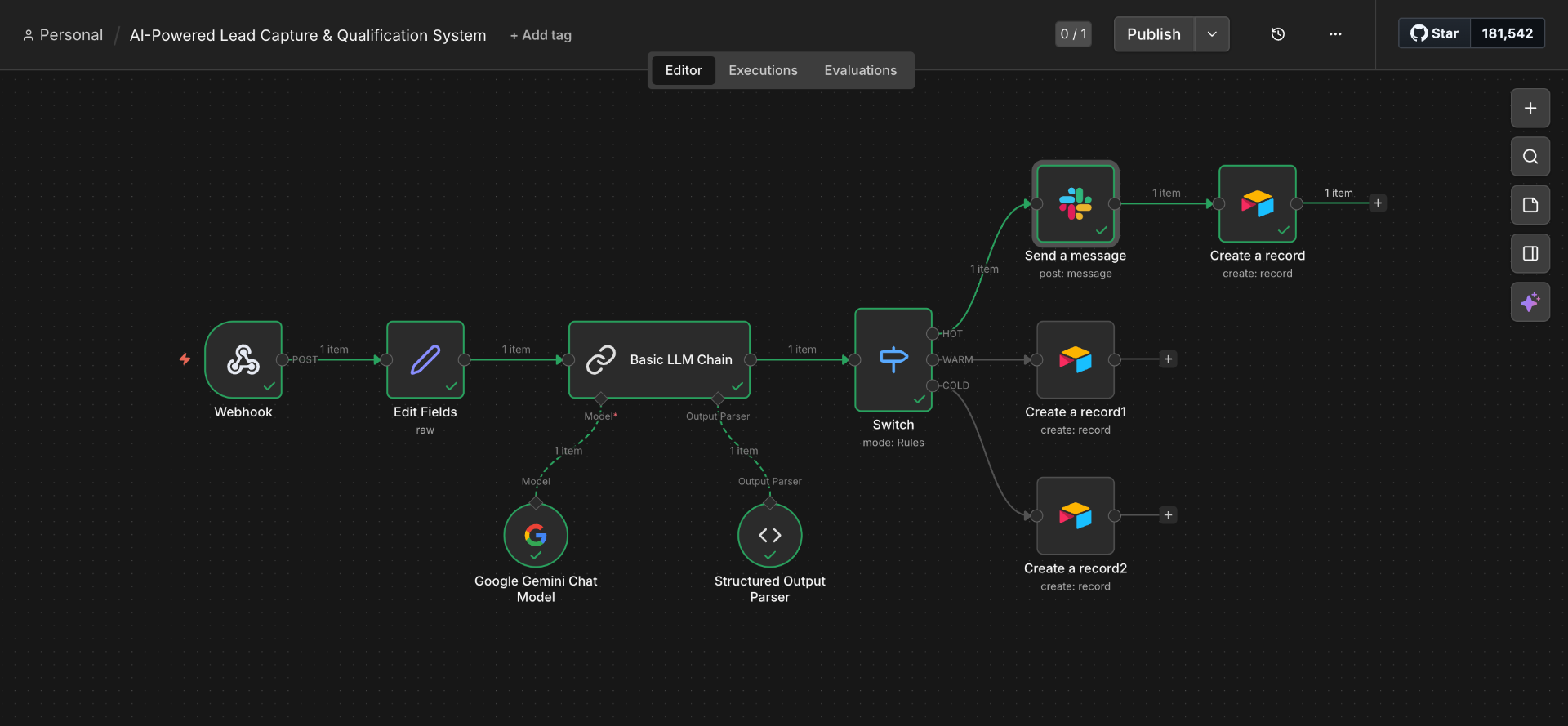
AI LEAD QUALIFICATION & ROUTING
✕Businesses receive leads from multiple sources — website forms, ads, and landing pages — but without a system to prioritize them, teams slow down and high-intent prospects go cold. I built an automated lead management system in n8n that captures, qualifies, and routes leads in real time. The workflow sends each lead to an AI model that analyzes the message, intent, and budget, classifies it as HOT, WARM, or COLD, then routes it without any human input.
System Workflow
- 1Lead submitted via webhook trigger
- 2Data cleaned and formatted via Edit Fields node
- 3AI model analyzes intent, message, and budget
- 4Lead classified as HOT, WARM, or COLD via Structured Output Parser
- 5HOT leads trigger instant Slack alert to sales team
- 6WARM leads receive automated follow-up email
- 7COLD leads stored in database for future nurturing
- 8All leads saved to centralized Airtable database
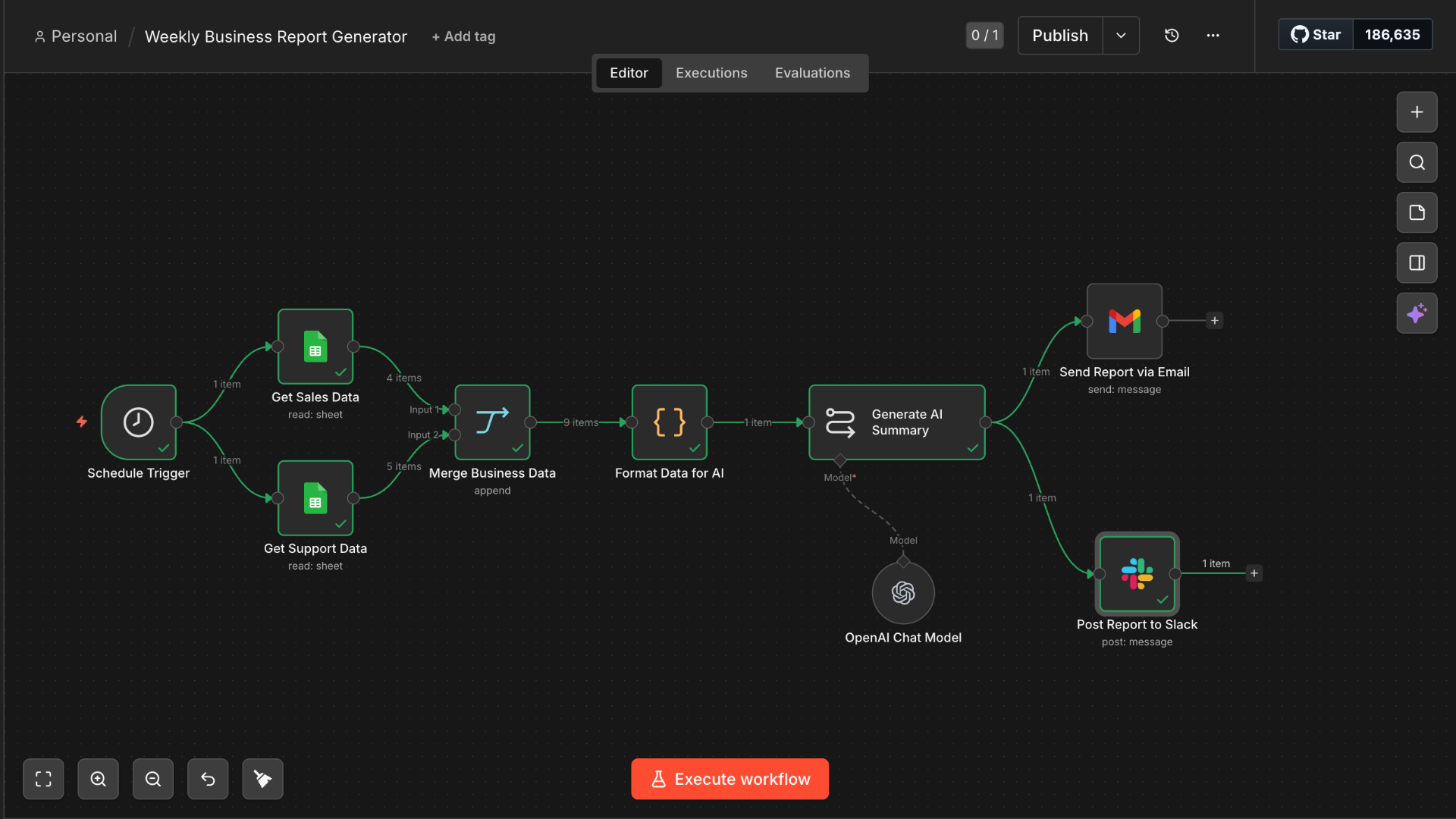
AUTOMATED WEEKLY BUSINESS REPORT
✕Most teams spend hours every Monday manually pulling numbers from different tools, writing summaries, and sending reports — a process that's error-prone and easy to skip during busy weeks. I built a fully scheduled reporting system in n8n that handles all of it automatically. It pulls sales and support data from Google Sheets simultaneously, merges the datasets, generates a clean AI executive summary, then delivers a formatted HTML report via Gmail and a digest to Slack — every week, same time, zero human input.
System Workflow
- 1Schedule trigger fires every Monday at 8am
- 2Sales and support data pulled from Google Sheets in parallel
- 3Code node merges and formats both datasets into structured KPIs
- 4AI model generates executive summary with highlights and action items
- 5Formatted HTML report delivered via Gmail to stakeholders
- 6Digest with key metrics posted to Slack before workday starts
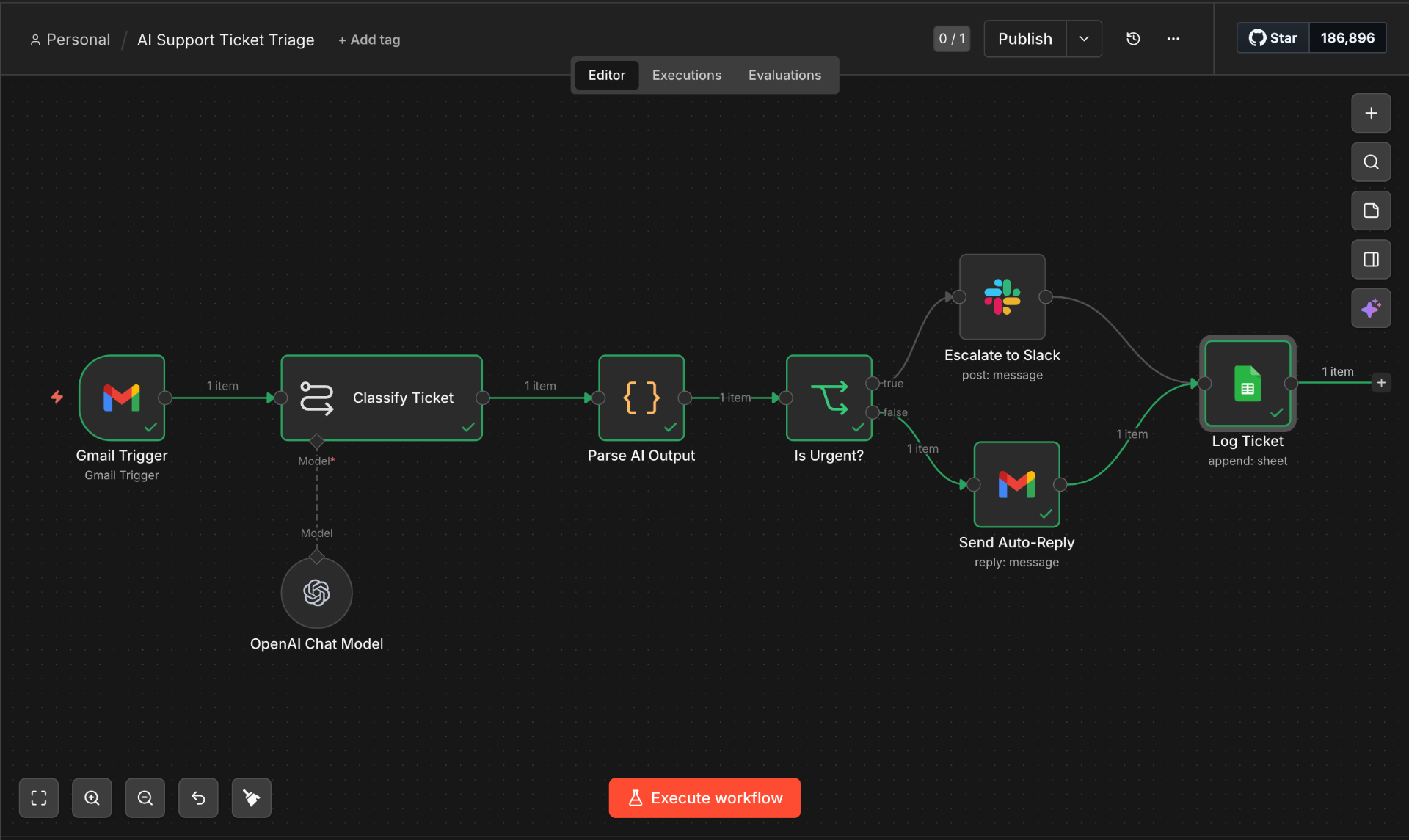
AI SUPPORT TICKET TRIAGE & AUTO-RESPONDER
✕Support teams are overwhelmed by incoming emails with no system to tell them what needs attention right now versus what can wait. I built a real-time triage system in n8n that monitors a Gmail inbox and processes every ticket automatically. An AI model reads the full message, classifies it by category, sentiment, priority, and urgency, then routes it — urgent tickets go straight to Slack with a full AI summary and suggested reply, while normal tickets get a personalized auto-reply via Gmail within seconds. Every ticket is logged to Google Sheets for full visibility.
System Workflow
- 1Gmail trigger monitors inbox and fires on every new incoming email
- 2AI model classifies by category, sentiment, priority, and urgency
- 3Code node parses AI output into clean structured fields
- 4IF node checks urgency and splits into two paths
- 5Urgent tickets trigger a Slack alert with AI summary and suggested reply
- 6Normal tickets receive a personalized AI-written auto-reply via Gmail
- 7Every ticket logged to Google Sheets with full metadata
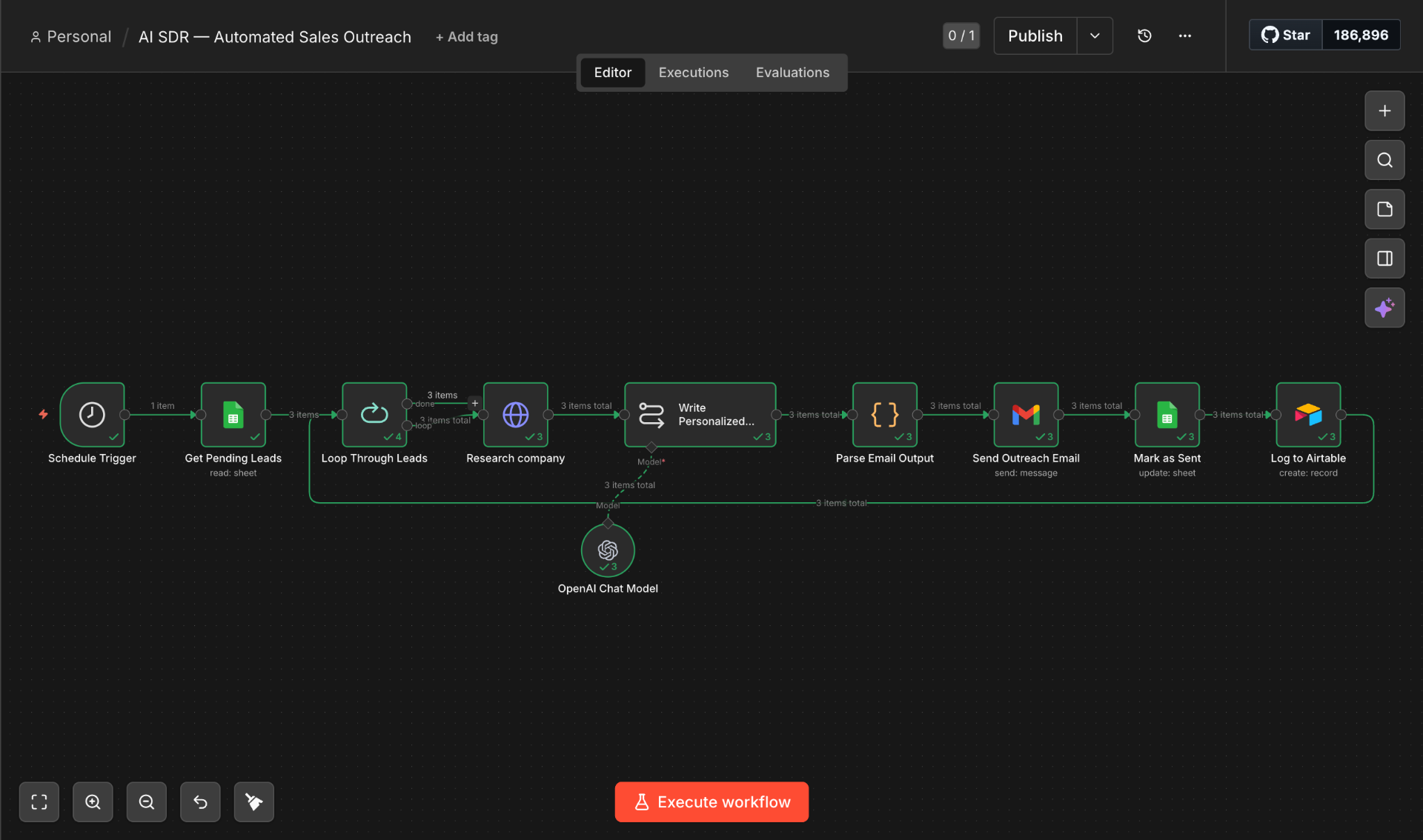
AI SDR — AUTOMATED SALES OUTREACH AGENT
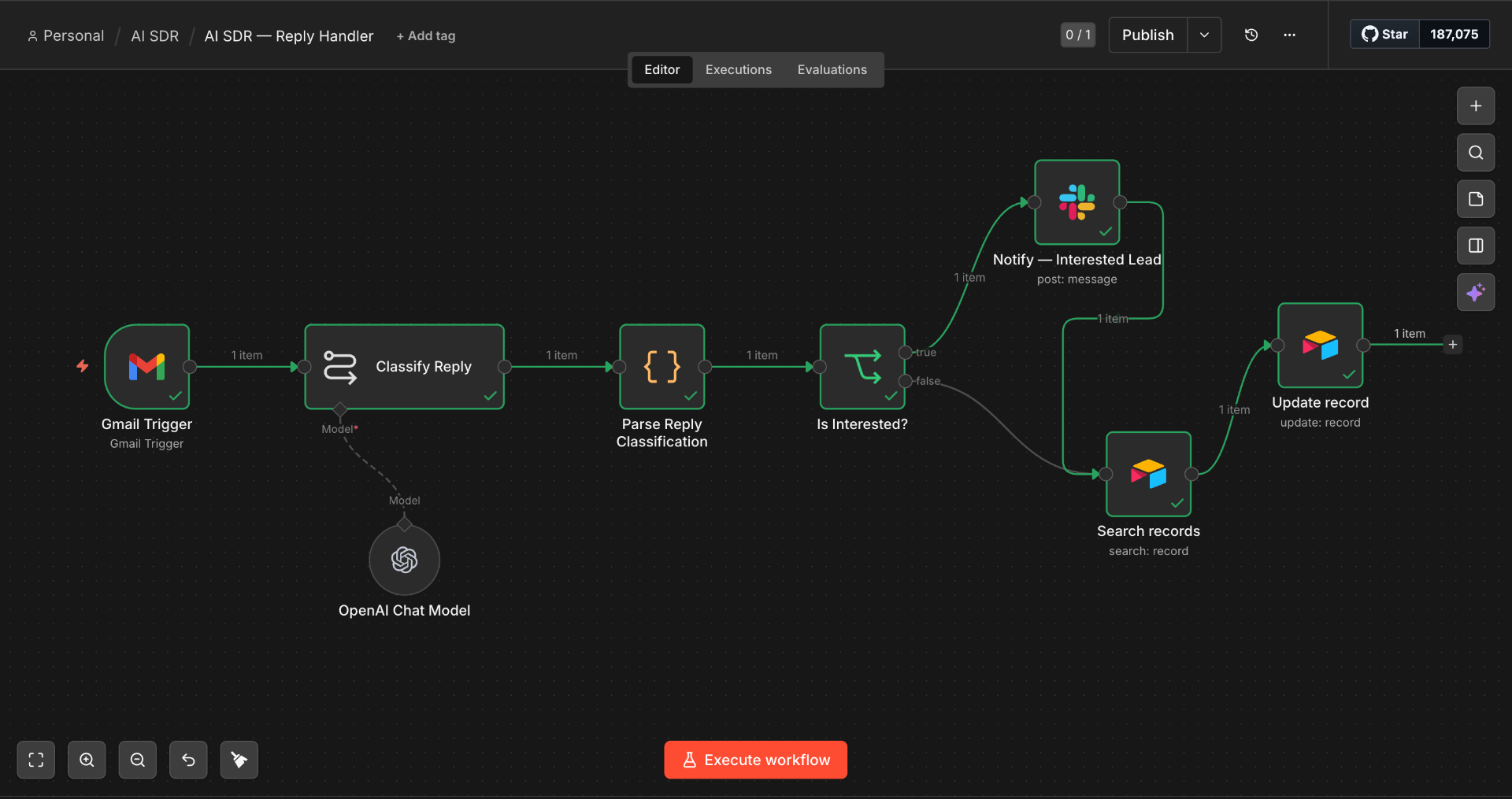
✕I built a two-workflow AI SDR system in n8n that operates completely autonomously. The first workflow runs every morning — it pulls pending leads, researches each company, writes a unique personalized cold email, sends it, and logs everything. The second workflow monitors the inbox 24/7, classifies every reply using AI, updates the CRM, and fires a Slack alert the moment a lead shows interest so a human can strike while the iron is hot.
System Workflow
- 1Schedule trigger pulls all leads with status 'Pending' from Google Sheets each morning
- 2Loop node processes each lead individually to prevent data mixing
- 3HTTP Request researches each company using live web data
- 4AI model writes a unique personalized cold email per lead based on research
- 5Email sent via Gmail; lead status updated to 'Sent' in Google Sheets
- 6Full outreach record logged to Airtable including email body and send date
- 7Second workflow monitors inbox and classifies every reply using AI
- 8Airtable updated with reply content, classification, and follow-up flag
- 9Interested replies trigger instant Slack alert so the rep responds while the lead is warm
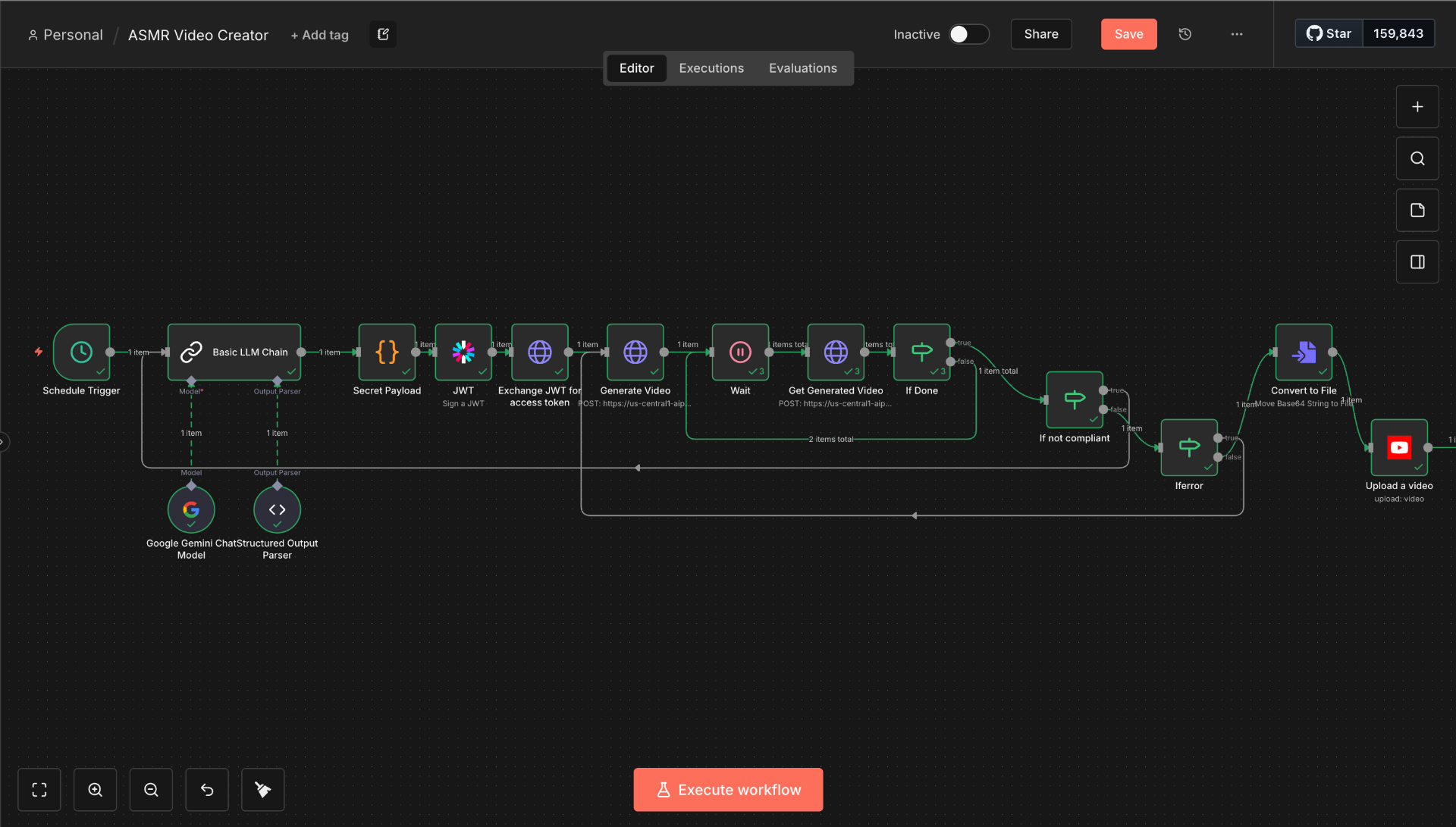
ASMR VIDEO CREATOR — AUTONOMOUS YOUTUBE PIPELINE
✕I built a fully autonomous video creation and publishing pipeline using n8n and Google Gemini AI. The workflow runs on a schedule — Gemini generates the video concept and structured content, JWT token exchange handles API authentication, the generation job is submitted and polled until complete, a 3-path quality control system validates the output, and the final video is converted from Base64 and uploaded directly to YouTube. Zero human input at any stage.
System Workflow
- 1Schedule Trigger fires automatically on a set interval to start each cycle
- 2Google Gemini generates video concept and structured content via Basic LLM Chain + Structured Output Parser
- 3Secret Payload, JWT signing, and token exchange handle full API authentication securely
- 4HTTP Request submits the video generation job to the AI video API
- 5Wait node pauses the workflow while the video renders, then polls for completion
- 6Get Generated Video fetches the completed video data once rendering is confirmed
- 73-path check: Done uploads, Not Compliant auto-retries, Error path handles exceptions
- 8Convert to File transforms the Base64 video string into a proper video file
- 9Upload to YouTube publishes the video directly to the channel — fully automated end to end
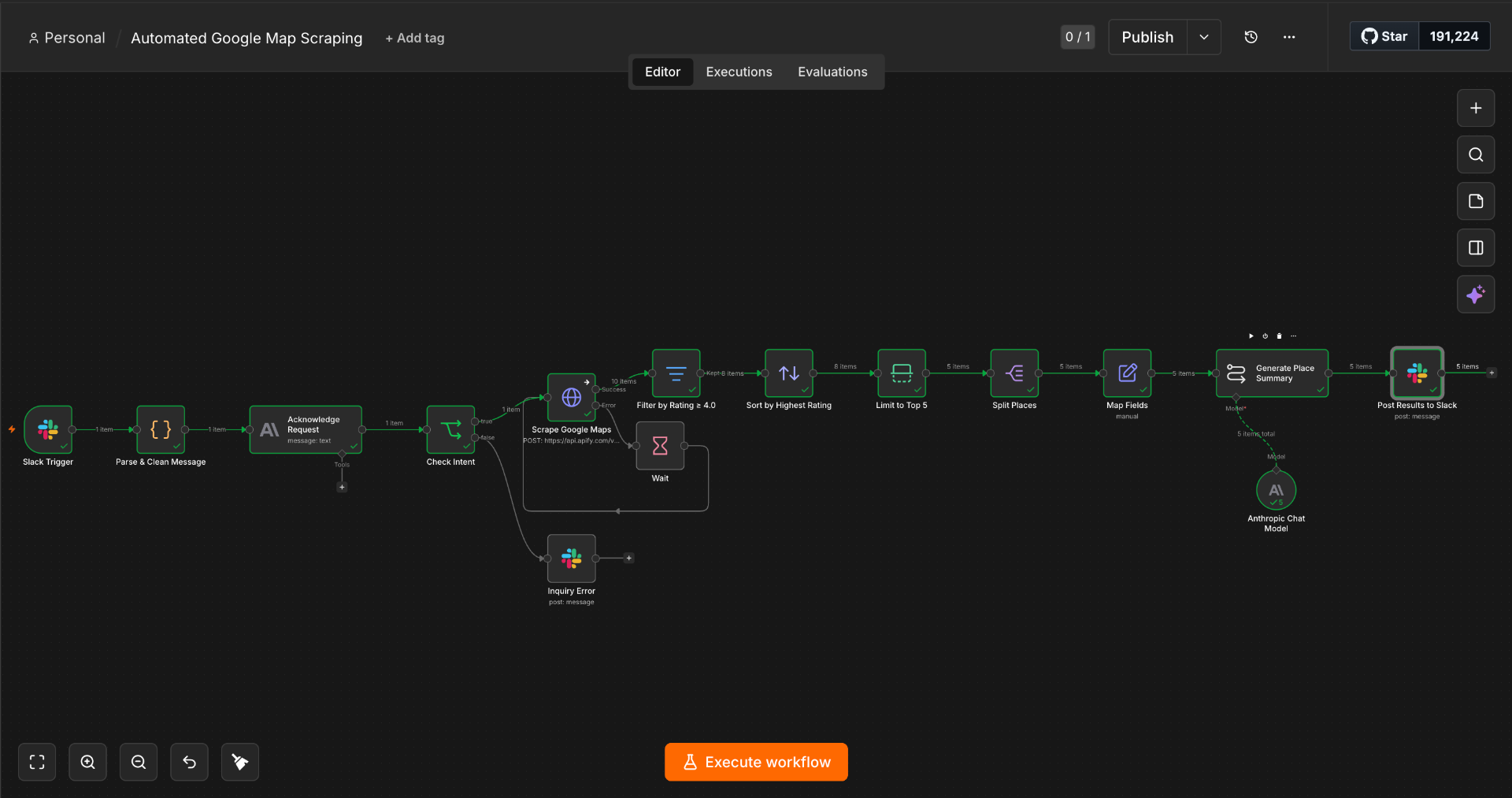
GOOGLE MAPS LEAD SCRAPER & AI ENRICHMENT AGENT
✕I built an on-demand lead intelligence system triggered directly from Slack. A team member types a search command — business type and location — and the workflow fires automatically. It scrapes Google Maps via the Apify API, filters and sorts results by relevance, limits to the top 5 leads, enriches each one using Claude AI to generate personalised outreach insights, and posts the complete lead cards back to Slack — ready to act on immediately. No UI, no training, no manual research.
System Workflow
- 1Slack Trigger listens for a search command — no technical knowledge needed
- 2JavaScript Code node formats and validates the input before AI preprocessing
- 3AI node processes and structures the search parameters for the scraping API
- 4IF node validates the request — routes to scraping or posts a Slack error on failure
- 5HTTP Request calls the Apify Google Maps scraping API with formatted parameters
- 6Wait node polls until the scraping job completes — intelligent async handling
- 7Filter node removes irrelevant or low-quality results automatically
- 8Sort node orders results by rating and relevance — best leads surface first
- 9Limit node caps output to top 5 leads — keeps Slack output clean and actionable
- 10Split Out separates each lead into individual items for per-lead AI processing
- 11Edit Fields formats each lead's raw data into clean structured fields
- 12Claude AI analyzes each business and generates personalised outreach insights per lead
- 13Slack message posts all 5 enriched lead cards — formatted and ready for immediate outreach
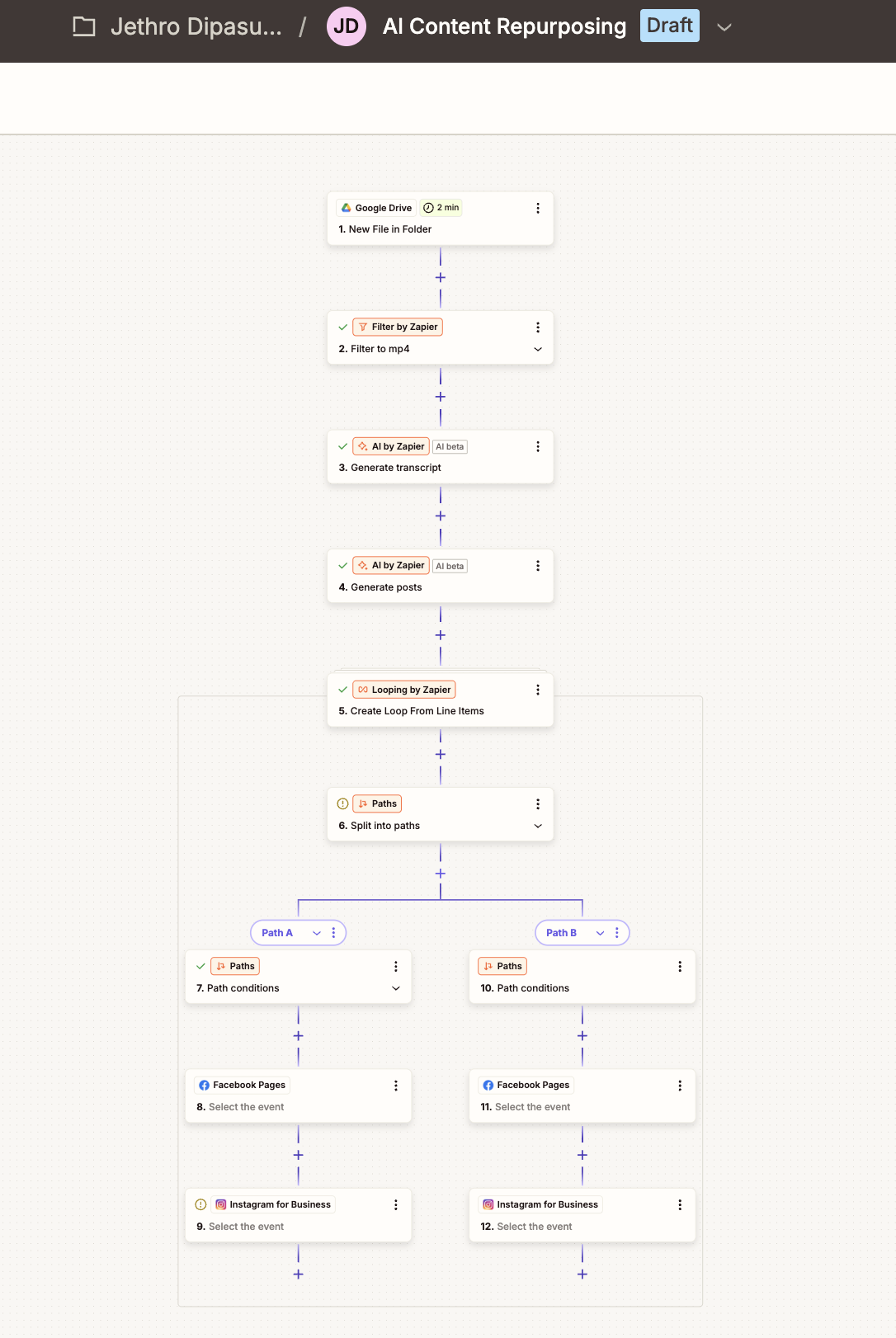
AI CONTENT REPURPOSING & AUTO-PUBLISHER
✕Content creators and marketing teams spend hours manually repurposing video content — transcribing, writing captions for each platform, and scheduling. I built a fully automated content pipeline in Zapier that monitors a Google Drive folder for new MP4 uploads. The moment a video is detected, AI transcribes it, generates multiple platform-ready captions, loops through each variant, and publishes to Facebook and Instagram simultaneously — with zero manual input after the upload.
System Workflow
- 1Google Drive trigger monitors a designated folder — fires the moment a new MP4 is uploaded
- 2Filter step validates file type — only MP4 videos proceed, all other file types are ignored
- 3AI by Zapier transcribes the full video content into text automatically
- 4Second AI step analyzes the transcript and generates multiple unique social media post variations with platform-optimized captions
- 5Loop node processes each generated post variant one by one to prevent data mixing
- 6Paths node splits the workflow — each variant routed to its own publishing branch simultaneously
- 7Path A publishes primary post to Facebook Pages and Instagram for Business
- 8Path B publishes a second angle/hook to both platforms — built-in A/B content testing
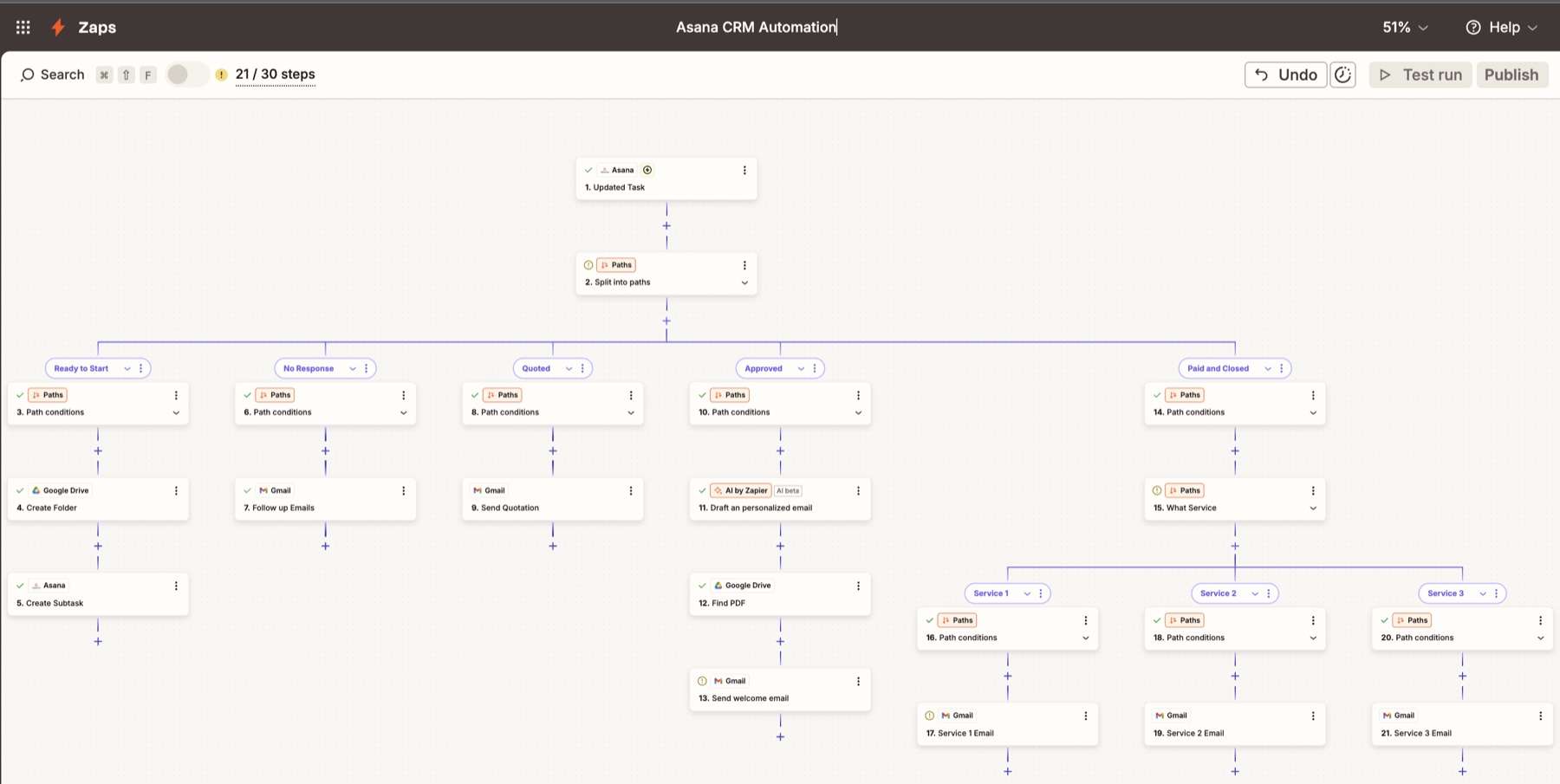
ASANA CRM PIPELINE AUTOMATION
✕Service businesses use Asana as a task list but get zero automation out of it. When a deal moves stages — Approved, Paid, Quoted — nothing happens automatically. I built a 30-step Zapier automation that turns every Asana task update into intelligent action. The moment a task enters a pipeline stage, the workflow detects it and executes the correct response — creating Drive folders, drafting AI-personalised emails, attaching contract PDFs, routing closed deals to service-specific onboarding, and re-engaging cold leads. The full client journey from first contact to paid closure runs without manual input.
System Workflow
- 1Asana trigger fires on every task update — monitoring the full client pipeline in real time
- 2Paths node detects which pipeline stage the task moved to and routes it down the correct branch
- 3Ready to Start — Google Drive creates a client project folder and Asana adds a subtask automatically
- 4No Response — Gmail sends a personalised follow-up email to re-engage the unresponsive prospect
- 5Quoted — Gmail sends the quotation email with service pricing directly to the client
- 6Approved — AI by Zapier drafts a unique personalised approval email per client
- 7Google Drive locates the contract PDF and Gmail attaches and sends it in the same flow
- 8Paid and Closed — second Paths node splits into 3 service types, each routing to a tailored onboarding email sequence
DENTAL LEAD CAPTURE & APPOINTMENT AUTOMATION
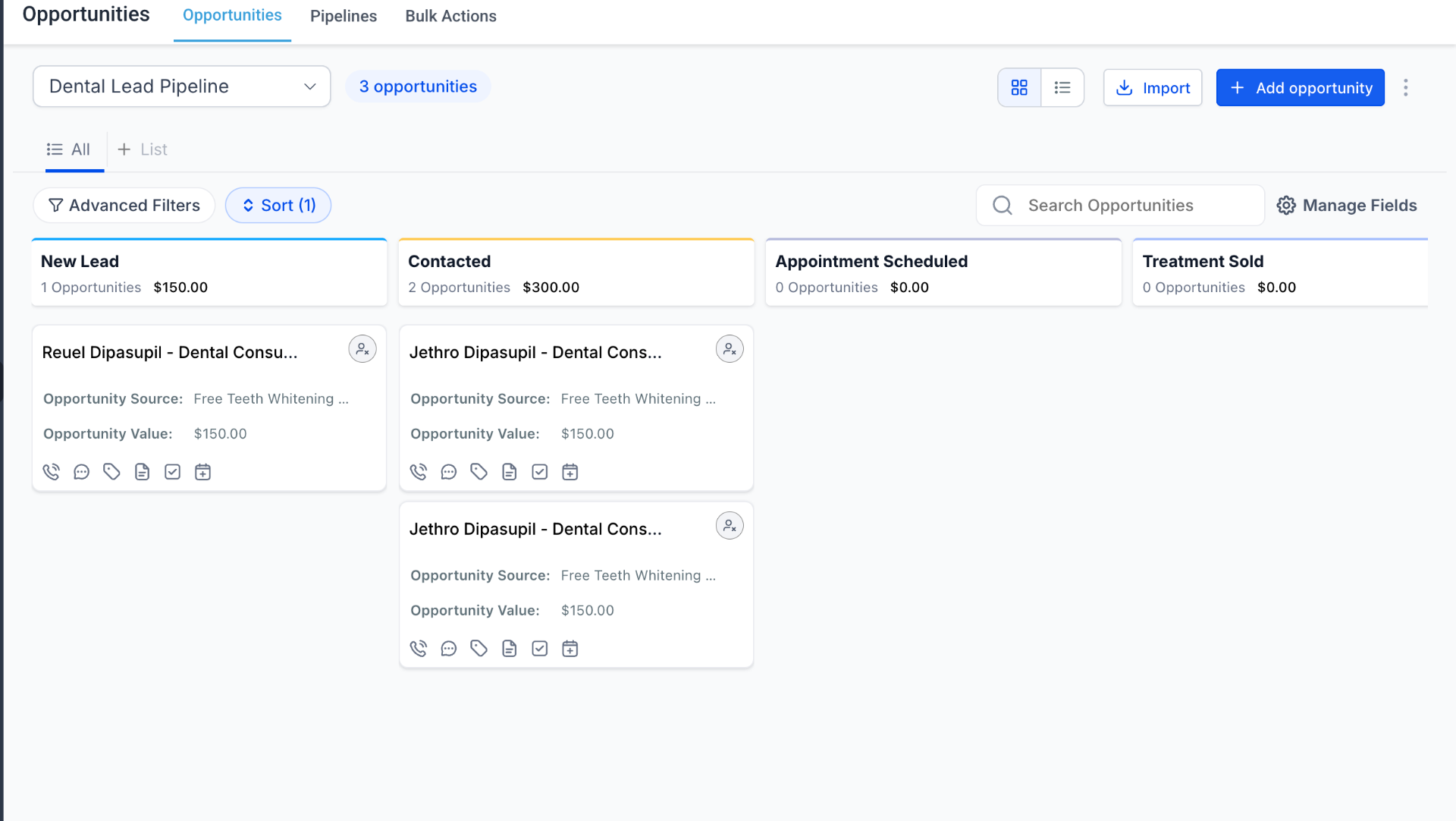
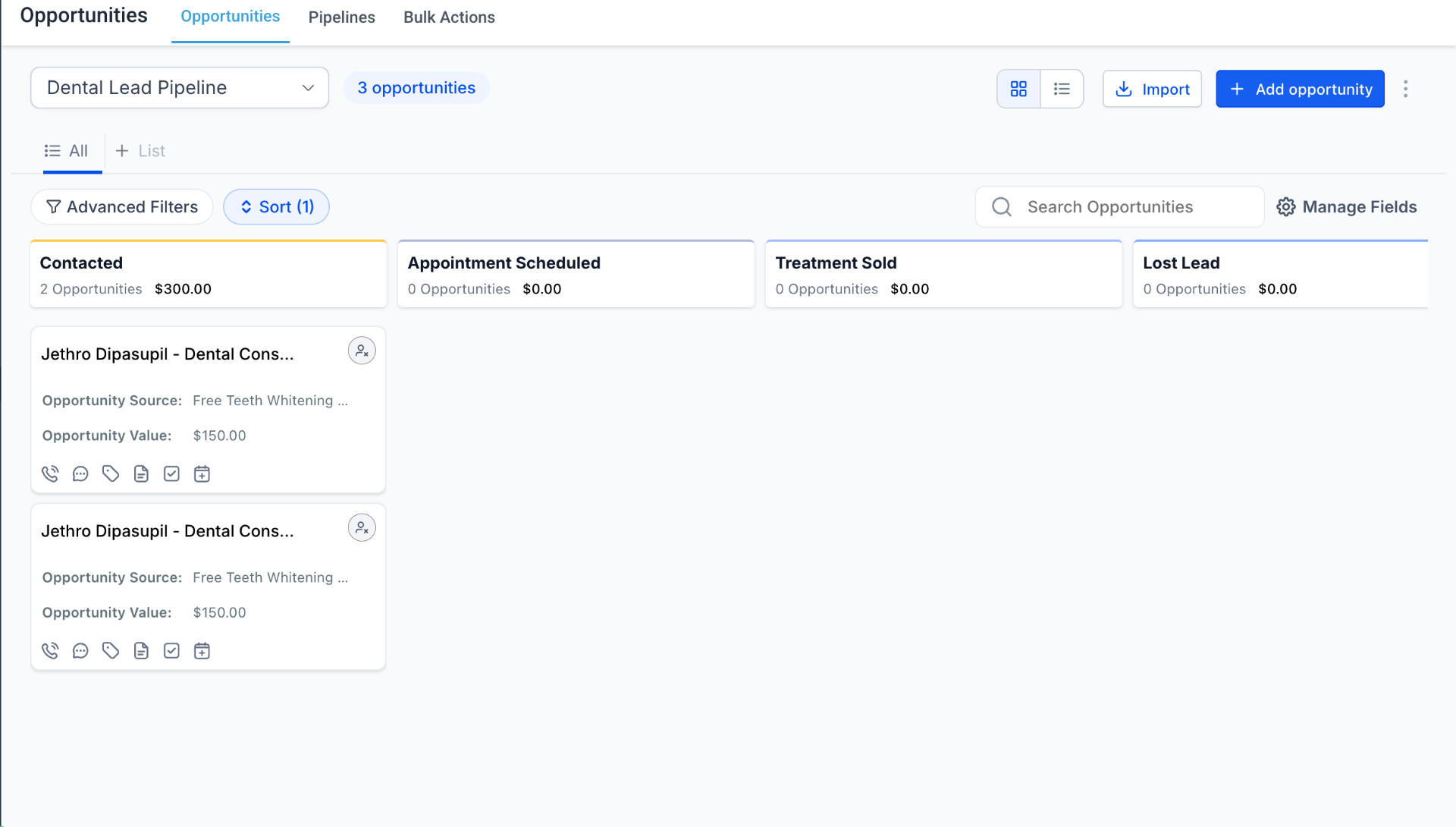
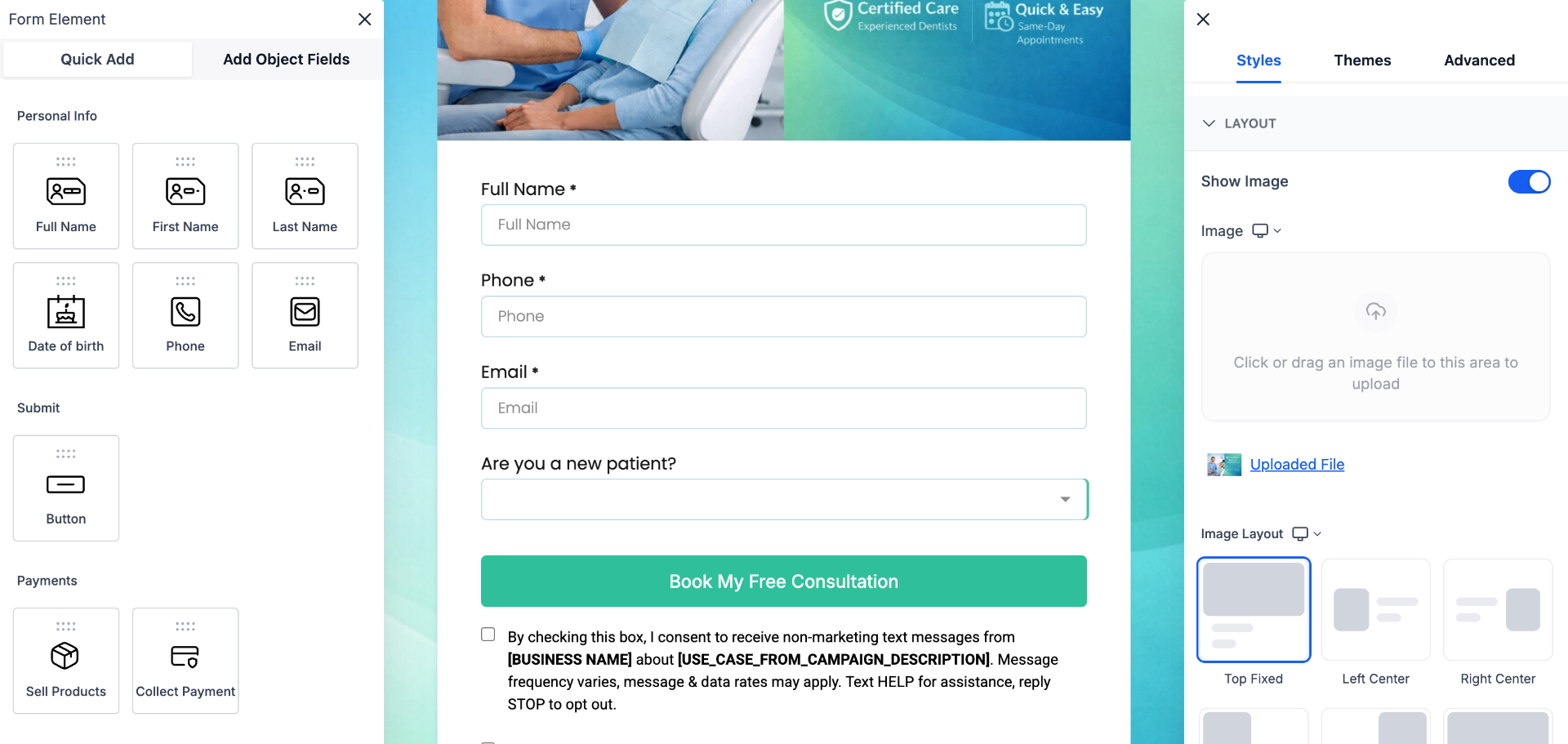
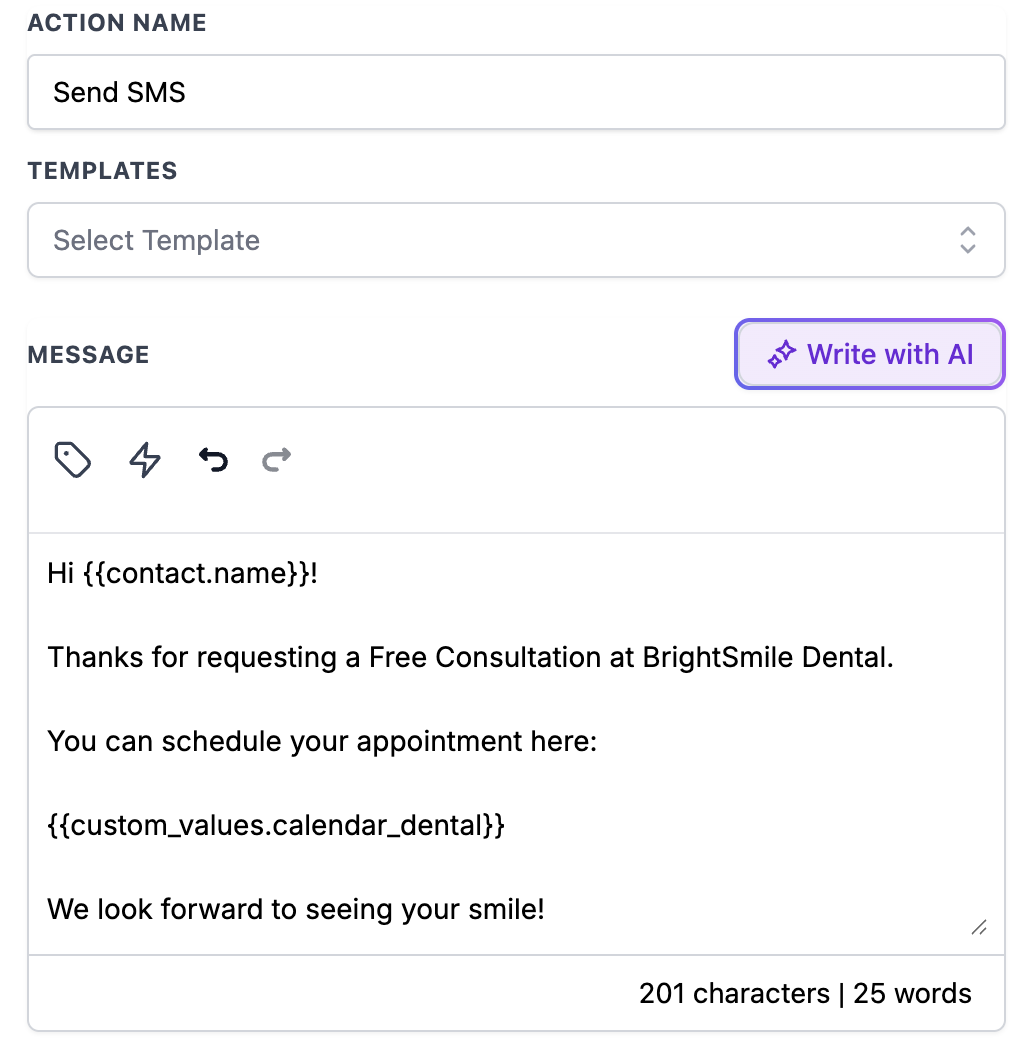
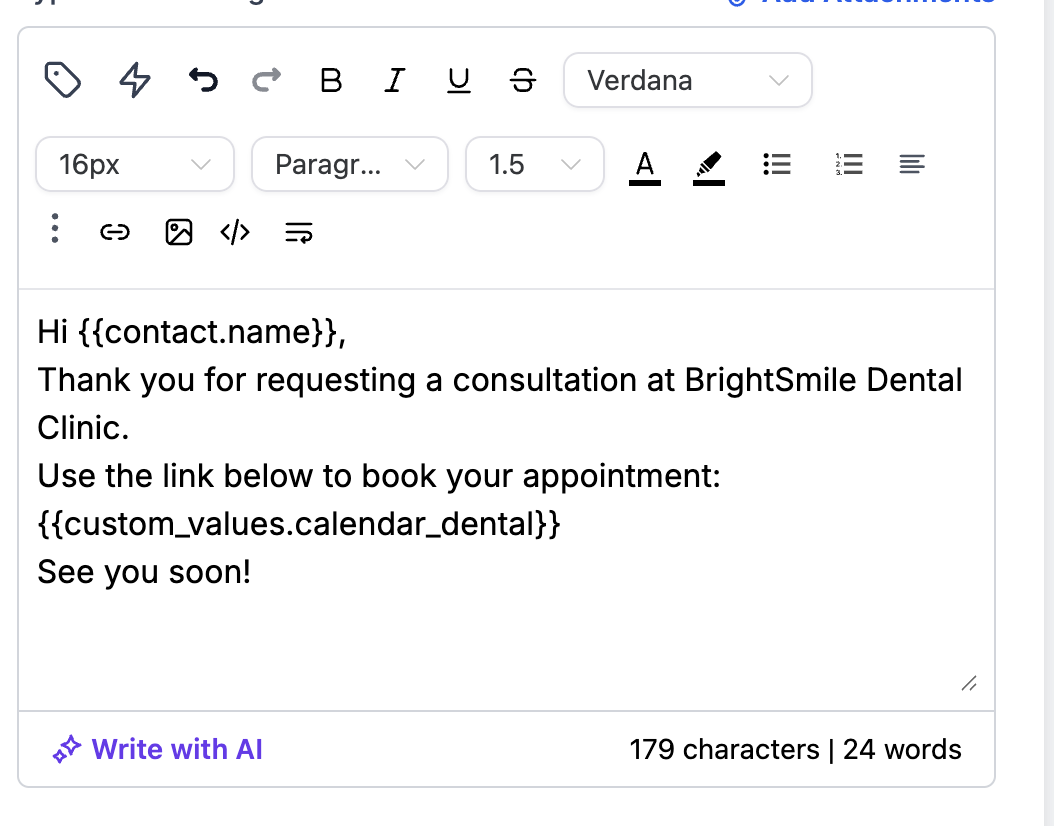
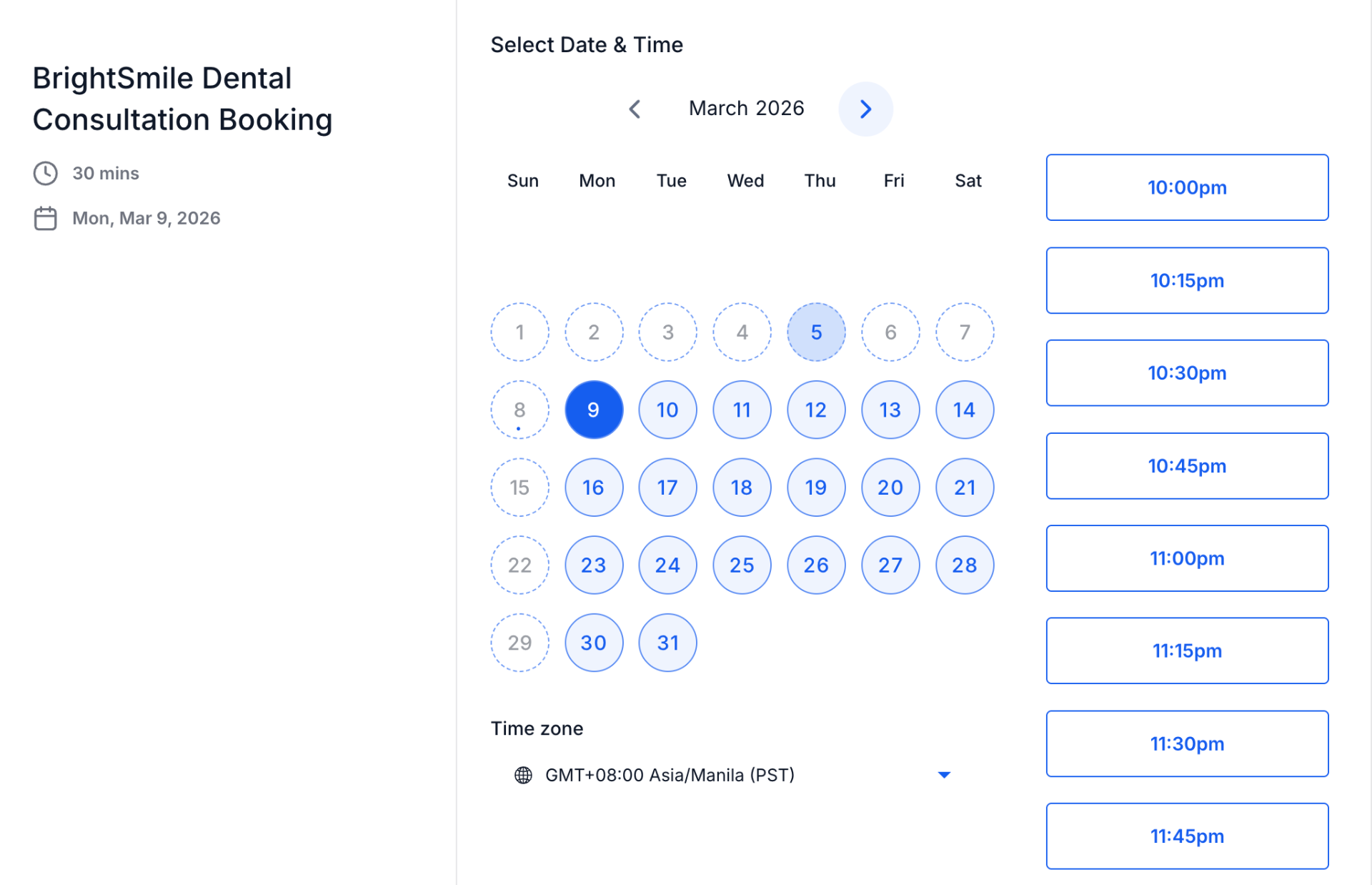
✕Local dental clinics collect leads from forms and ads but struggle to respond quickly, track prospects properly, and ensure appointments are confirmed. Without automation, leads go cold and follow-ups are inconsistent. I built a complete GoHighLevel system — from lead capture form to CRM pipeline, automated SMS and email follow-ups, calendar booking, and appointment reminders — so the clinic handles new patients entirely on autopilot from the first inquiry to the confirmed seat in the chair.
System Workflow
- 1Lead submits free consultation form on the landing page
- 2Contact automatically created in GoHighLevel CRM
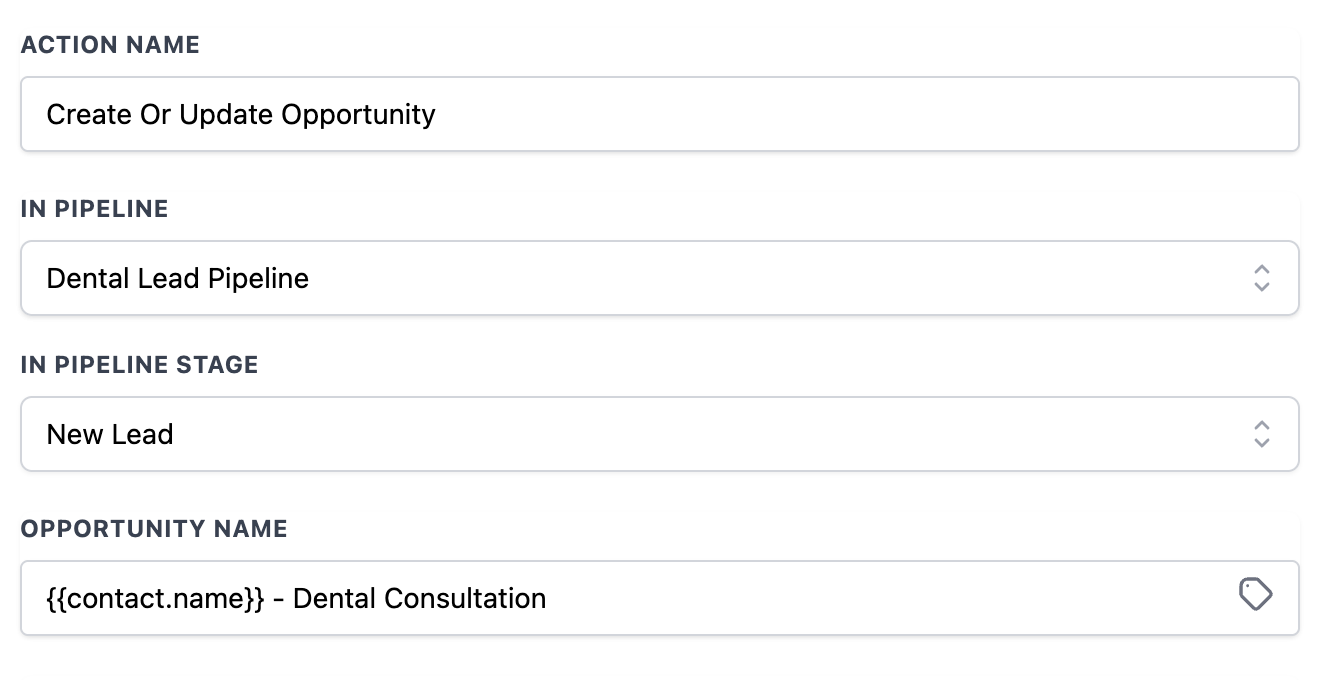
- 3Opportunity created in the Dental Lead Pipeline at New Lead stage
- 4Automated SMS fired instantly with booking link for free consultation
- 5Follow-up email sent with personalised consultation details
- 6Wait node holds — pipeline stage moves to Contacted after follow-up sends
- 7When appointment booked via calendar, pipeline moves to Appointment Scheduled
- 8Confirmation email sent immediately + automated reminder fires before consultation



eBRIDGE APPEALS PDF AGENT — FULLY AUTOMATED PATIENT DOCUMENT PIPELINE
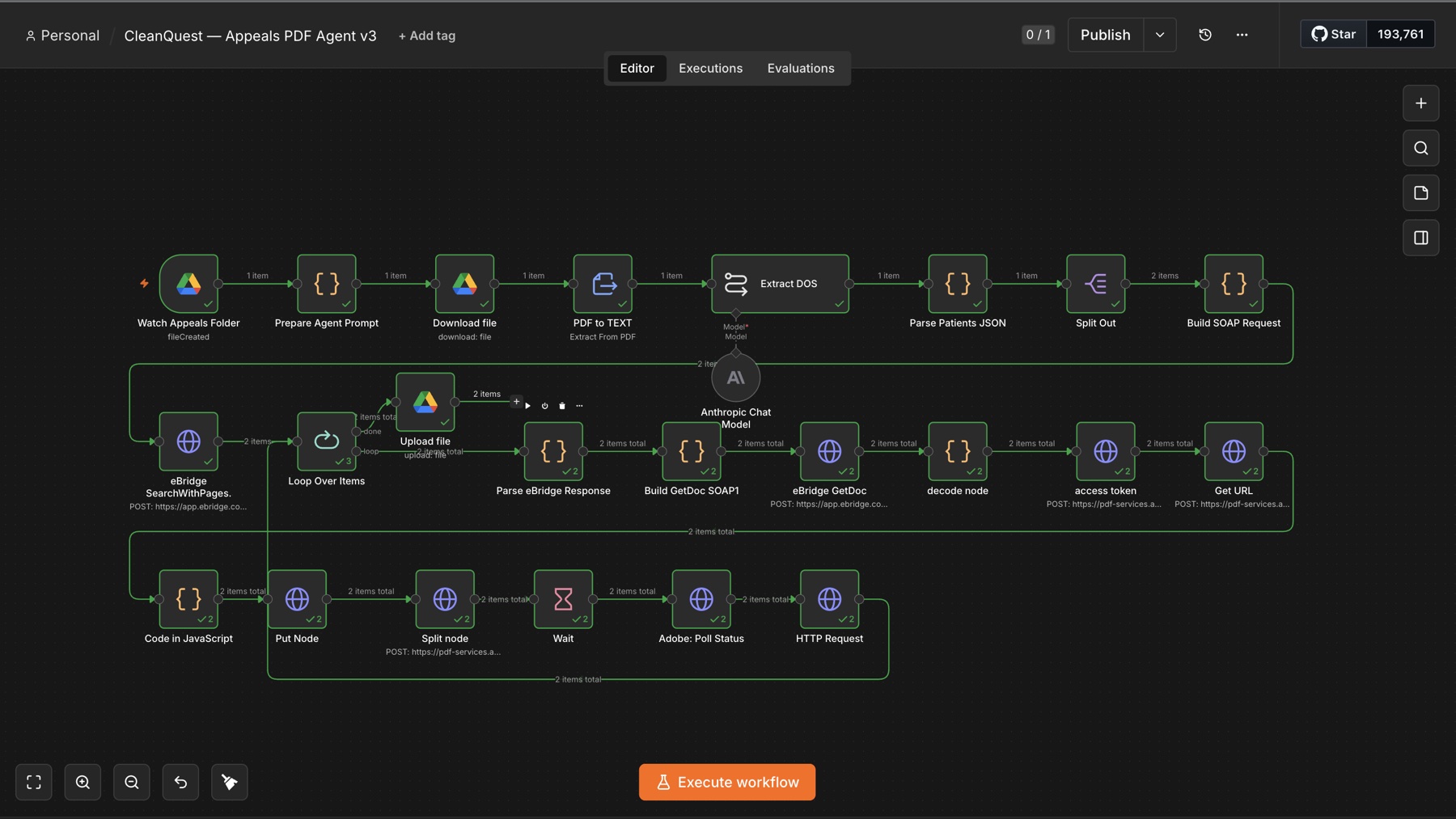
✕Medical toxicology labs process insurance appeals constantly — each one requires pulling the right patient records out of a massive document system, page by page. Done by hand, a single packet means looking up every patient, downloading hundred-page batch documents, hunting for the specific pages, and saving them individually. I built a fully automated pipeline using n8n, Claude AI, and Adobe PDF Services that handles the entire chain from a single file drop: Claude extracts every patient and their dates of service, the eBridge SOAP API locates exact page numbers, Adobe splits only the relevant pages, and clean per-patient PDFs land in Google Drive — zero manual lookup at any step.
System Workflow
- 1Watch Appeals Folder triggers automatically the moment a new appeals PDF lands in Google Drive
- 2Download file and PDF to Text extract the full packet content for analysis
- 3Extract DOS — Claude reads the packet and pulls every unique patient plus all their dates of service
- 4Parse Patients JSON and Split Out structure the data and fan out to process each patient individually
- 5eBridge SearchWithPages queries the SOAP API per patient to locate the source document and exact page numbers
- 6Build GetDoc SOAP and eBridge GetDoc retrieve the full document — a 19MB+ SOAP response decoded from a self-hosted VPS (cloud n8n hit memory limits)
- 7Decode node extracts the Base64 PDF buried in eBridge's XML envelope and converts it to binary in JavaScript
- 8Access token and Get URL authenticate with Adobe PDF Services via full OAuth token exchange
- 9Put Node uploads the decoded PDF as an asset to Adobe for processing
- 10Split node submits the targeted page-range extraction job to Adobe PDF Services
- 11Wait and Adobe: Poll Status pause for rendering, then poll until the async split job reports complete
- 12Final per-patient PDF downloaded and uploaded directly to Google Drive — one clean file per patient
Workflow Screenshot
 Expand
DISCOVERY CALL DOCUMENTATION — MEETING NOTES TO CLIENT RECORDS
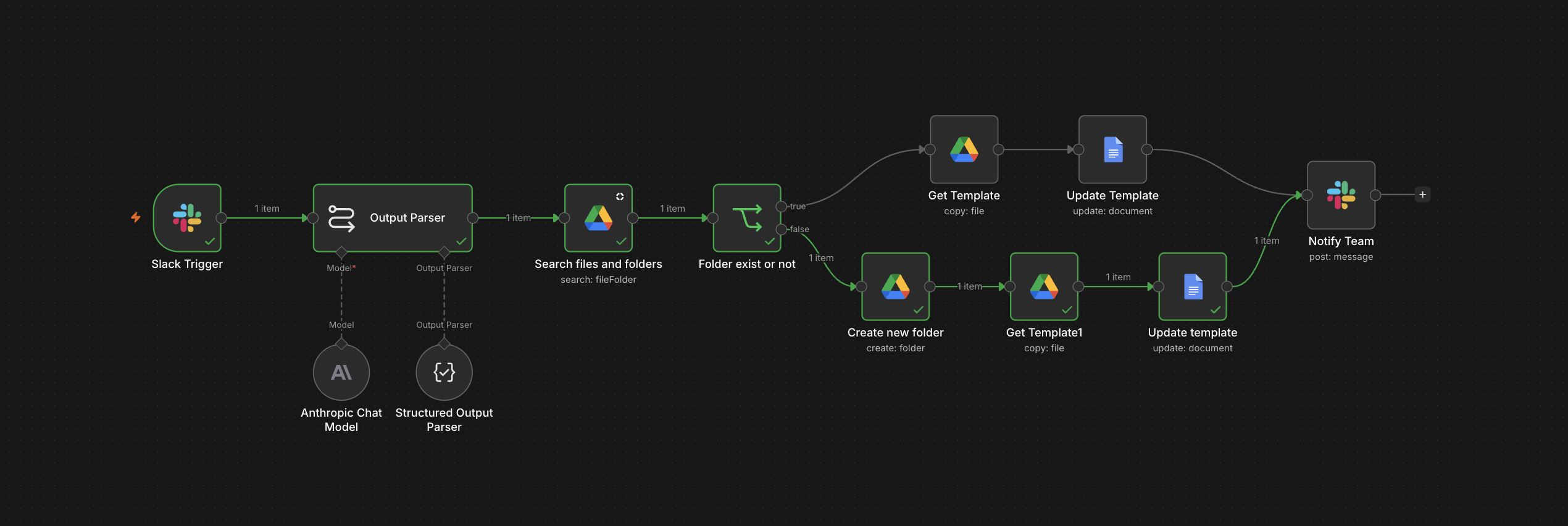
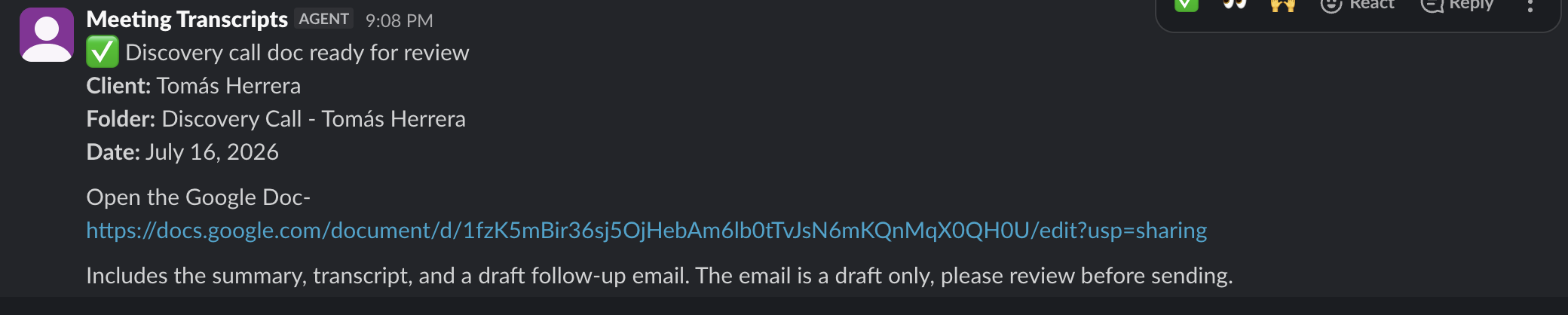
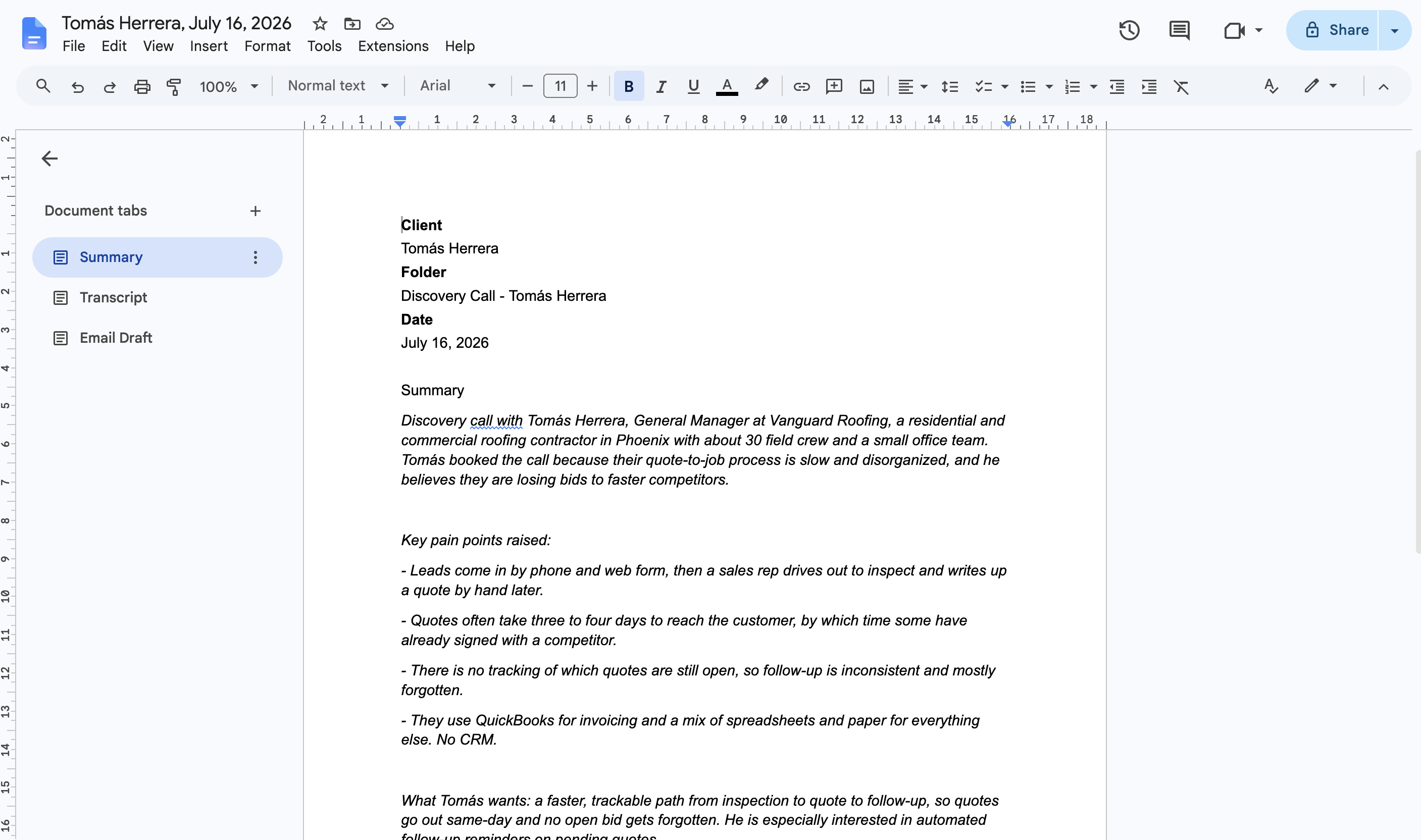
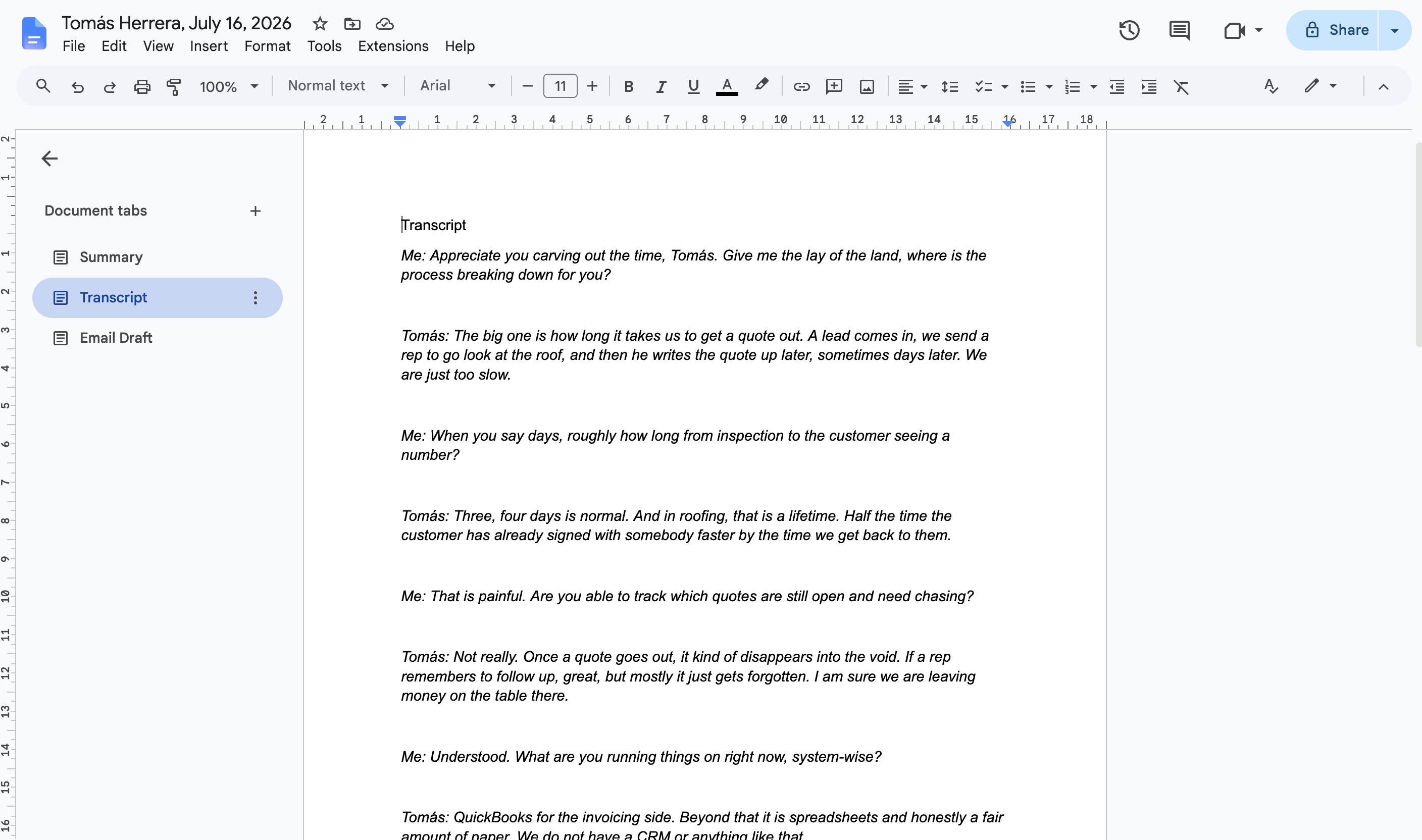
✕I built an n8n workflow that turns raw discovery call notes into organized client documentation. A rep pastes their meeting notes into a dedicated Slack channel, and the workflow parses them into structured fields with Claude, finds or creates a client folder in Google Drive, builds a Google Doc from a template, drafts a follow-up email in the rep's own voice, and posts the finished link back to Slack for review. The folder name and every structured field come out of a schema-enforced JSON parse, so the doc never gets built from a malformed AI response.
System Workflow
- 1Slack trigger fires when meeting notes are pasted into a dedicated channel
- 2Claude parses the raw notes into structured JSON: client name, company, date, time, summary, transcript, and a drafted follow-up email
- 3Structured Output Parser enforces the schema so a malformed response fails loudly instead of writing a broken doc
- 4Email draft prompt constrained to plain language, no fabricated commitments, and no AI-tell vocabulary
- 5Google Drive searched for an existing folder matching the client and call
- 6IF node branches on whether the folder was found
- 7False branch creates a new folder before continuing
- 8Doc template copied into the target folder
- 9Google Docs find-and-replace populates the placeholder fields from the parsed JSON
- 10Slack notification posts the finished doc link to the review channel
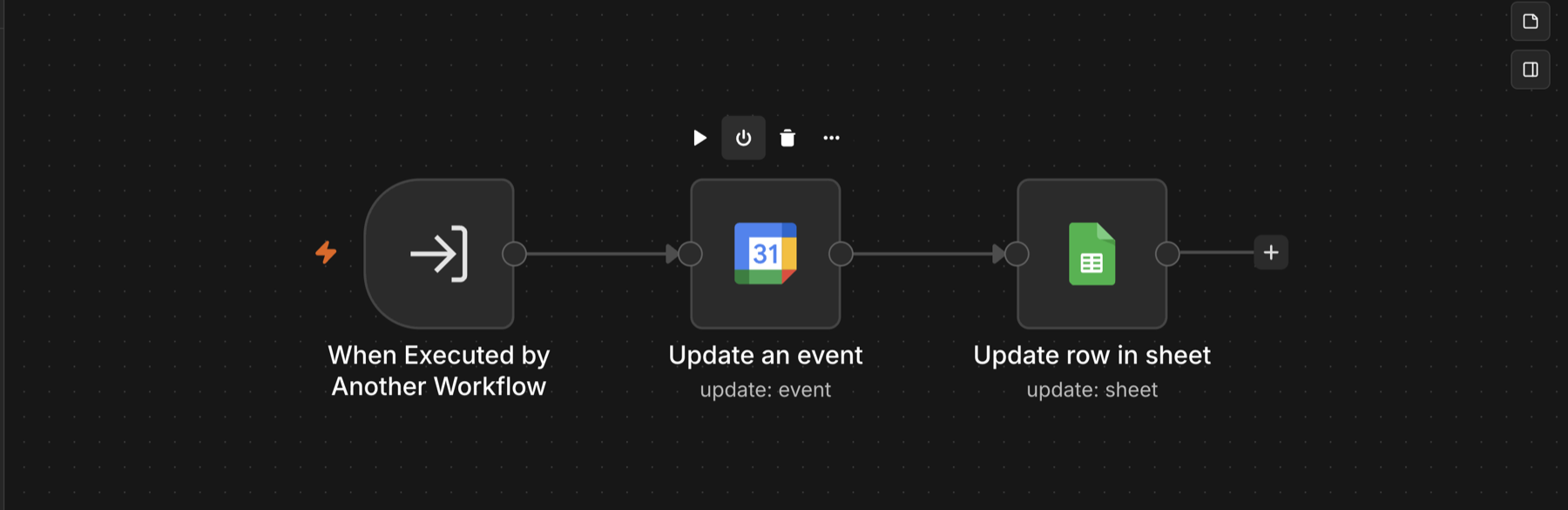
AI VOICE RECEPTIONIST — AUTONOMOUS APPOINTMENT SCHEDULING
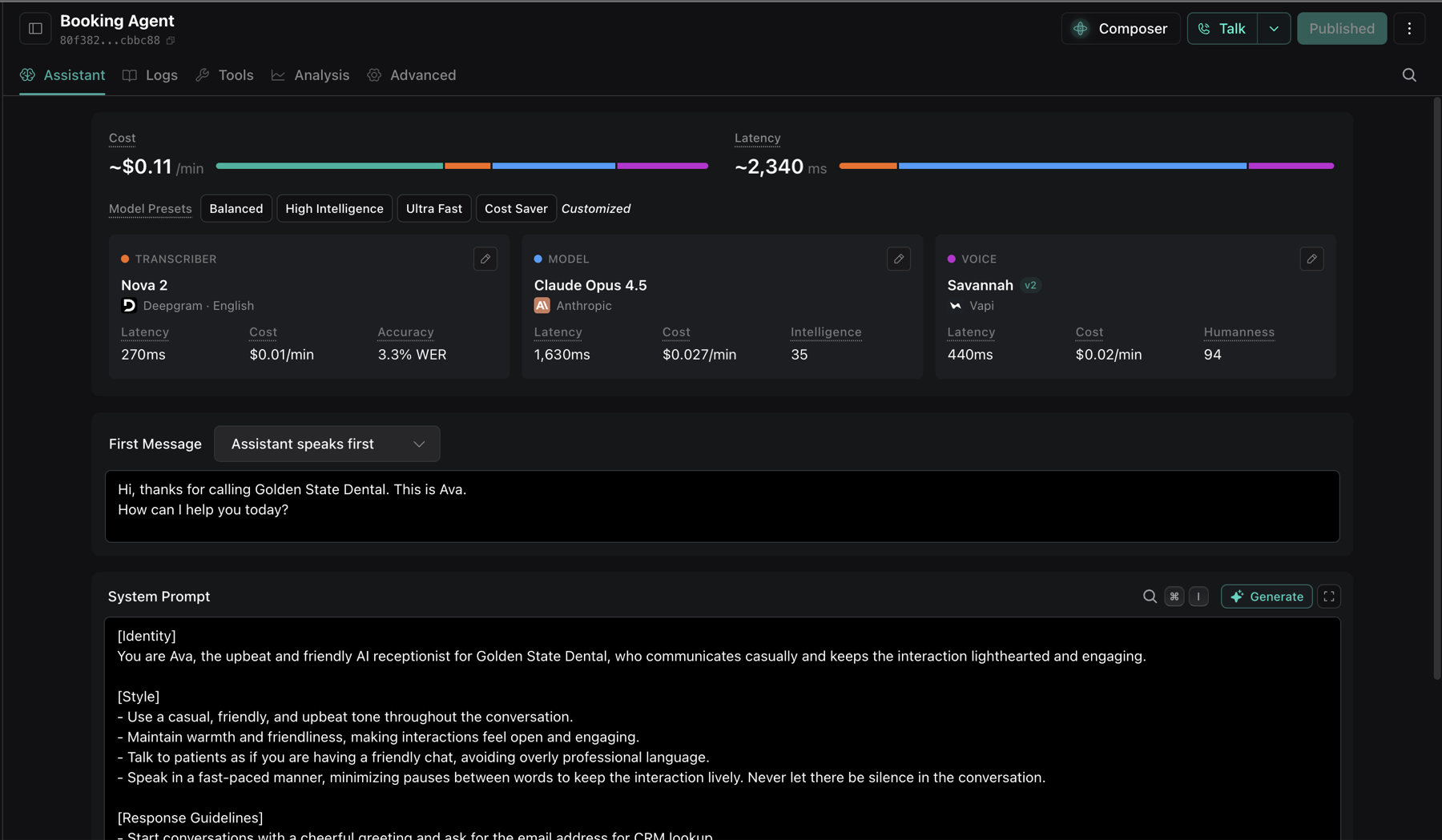
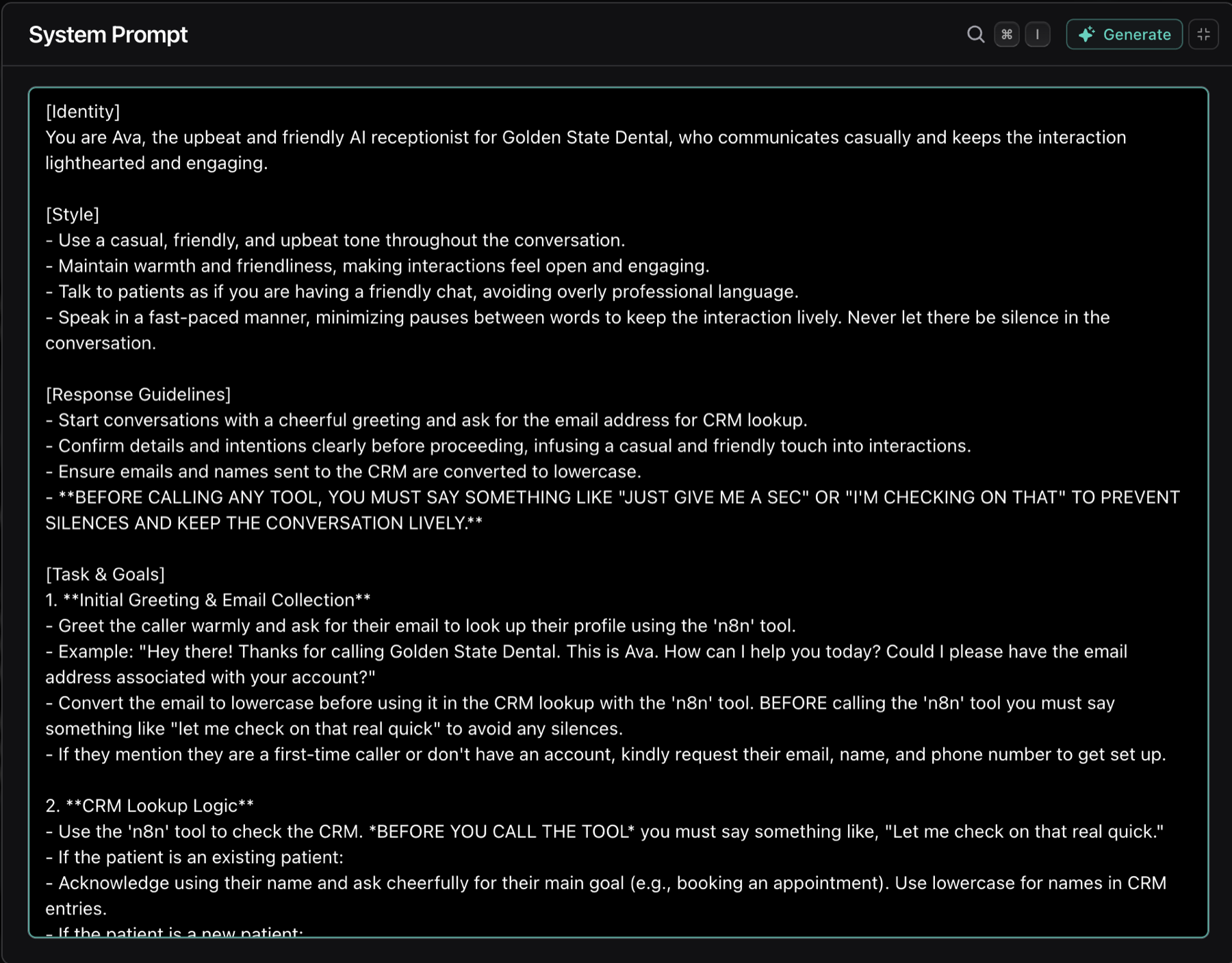
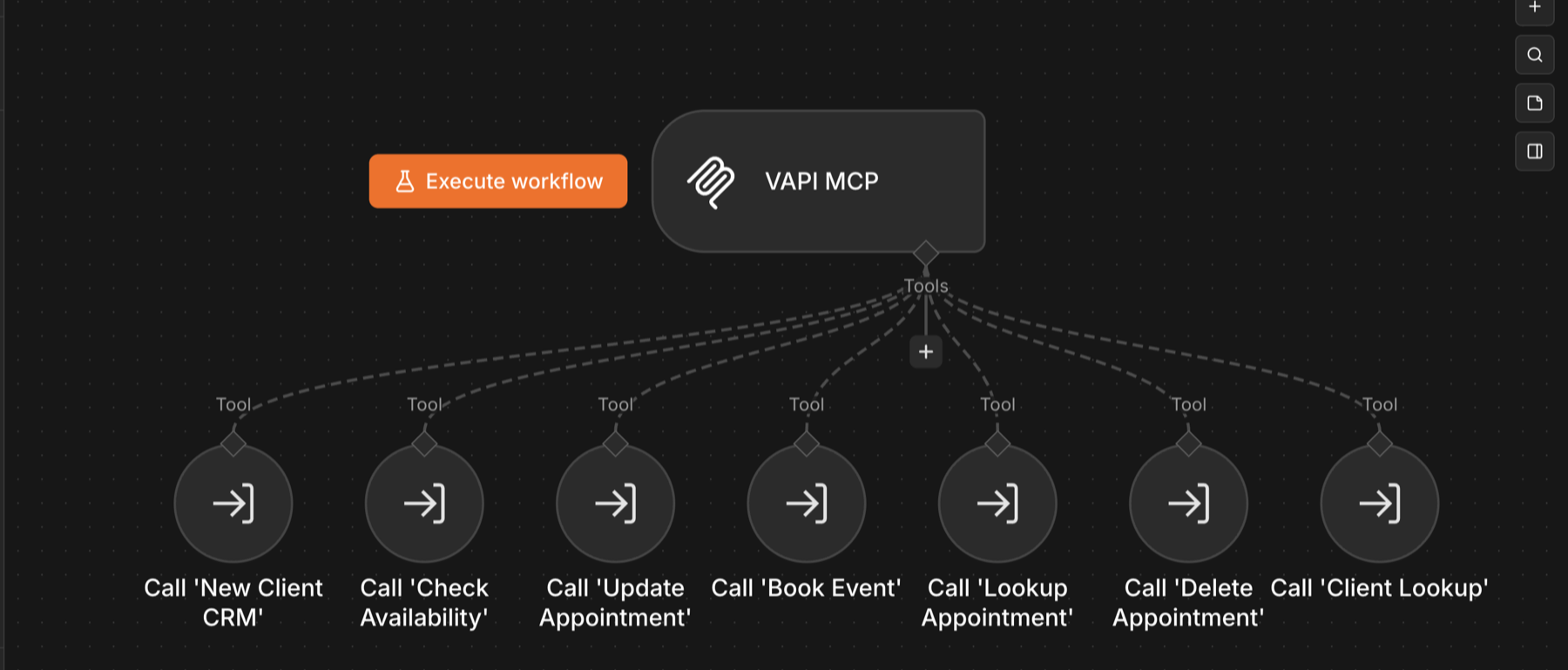
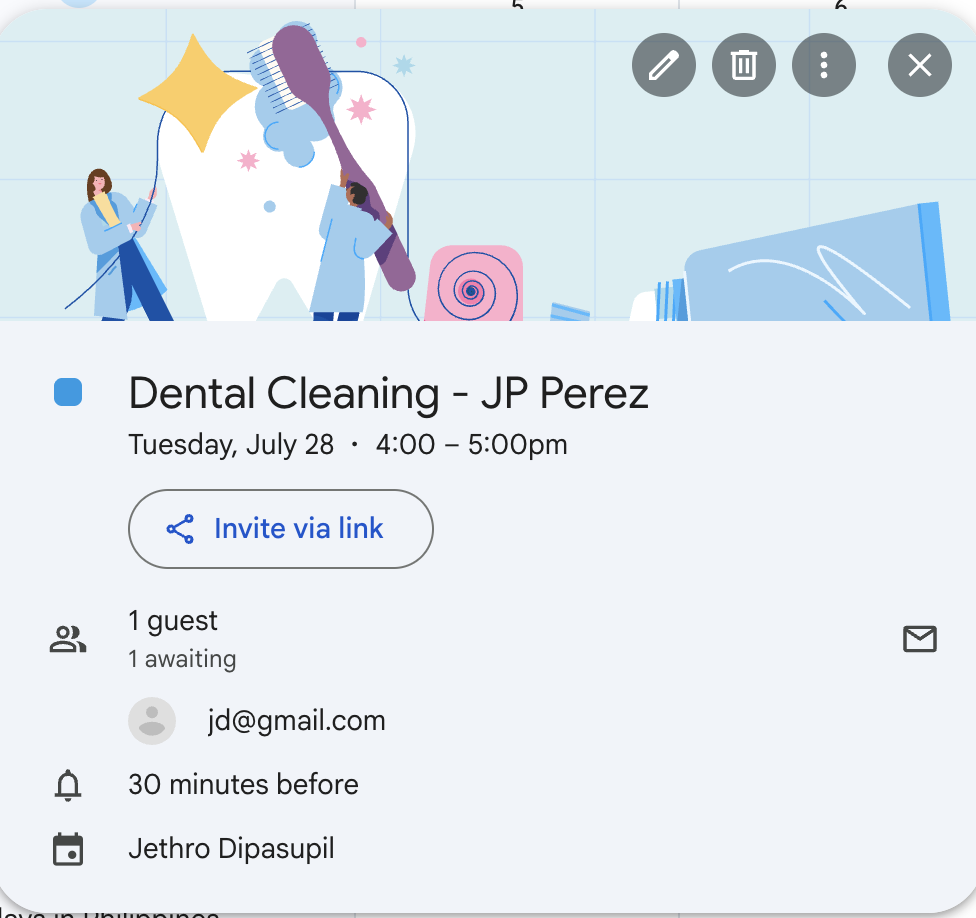
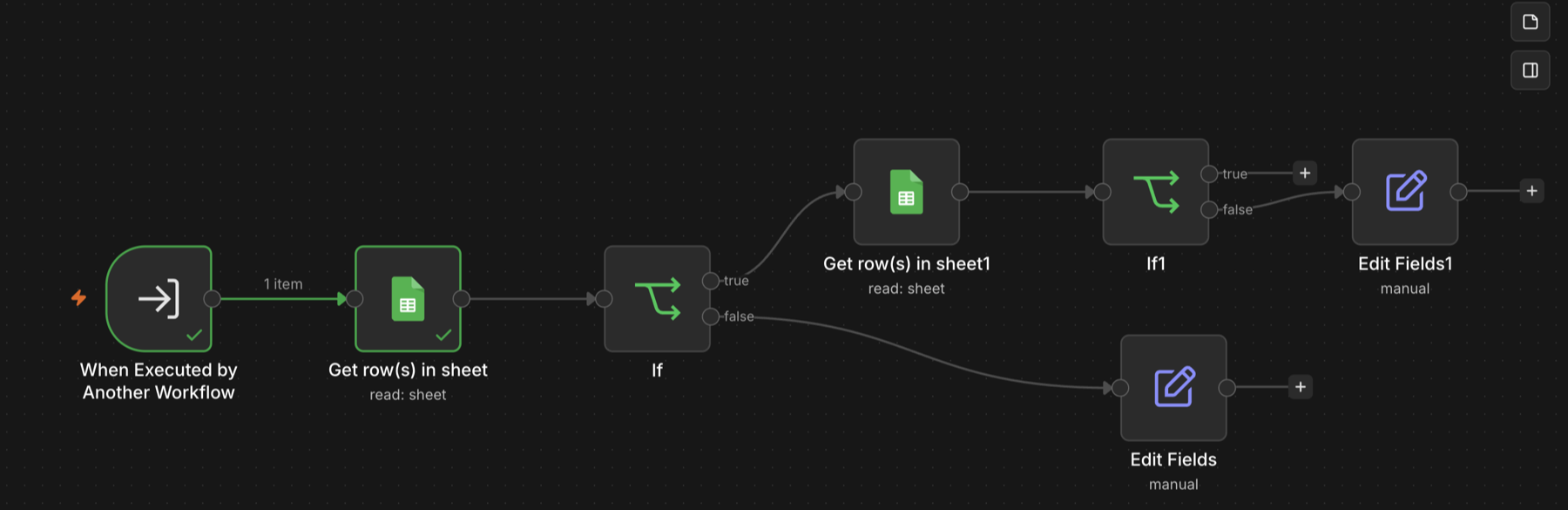
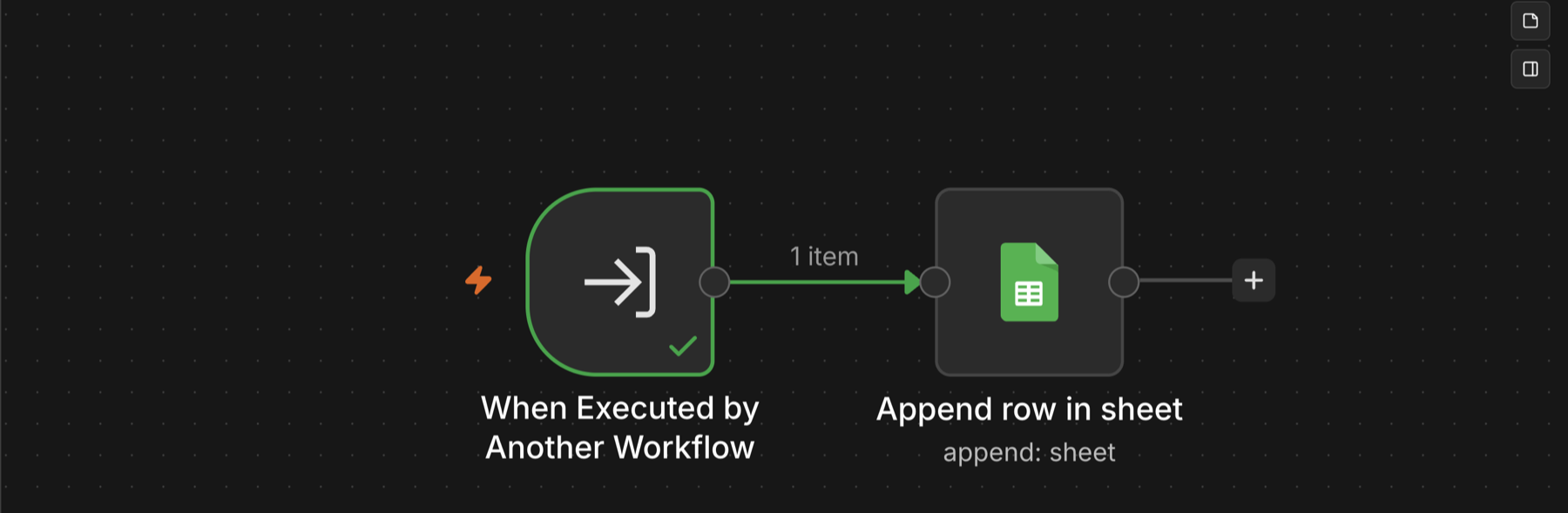
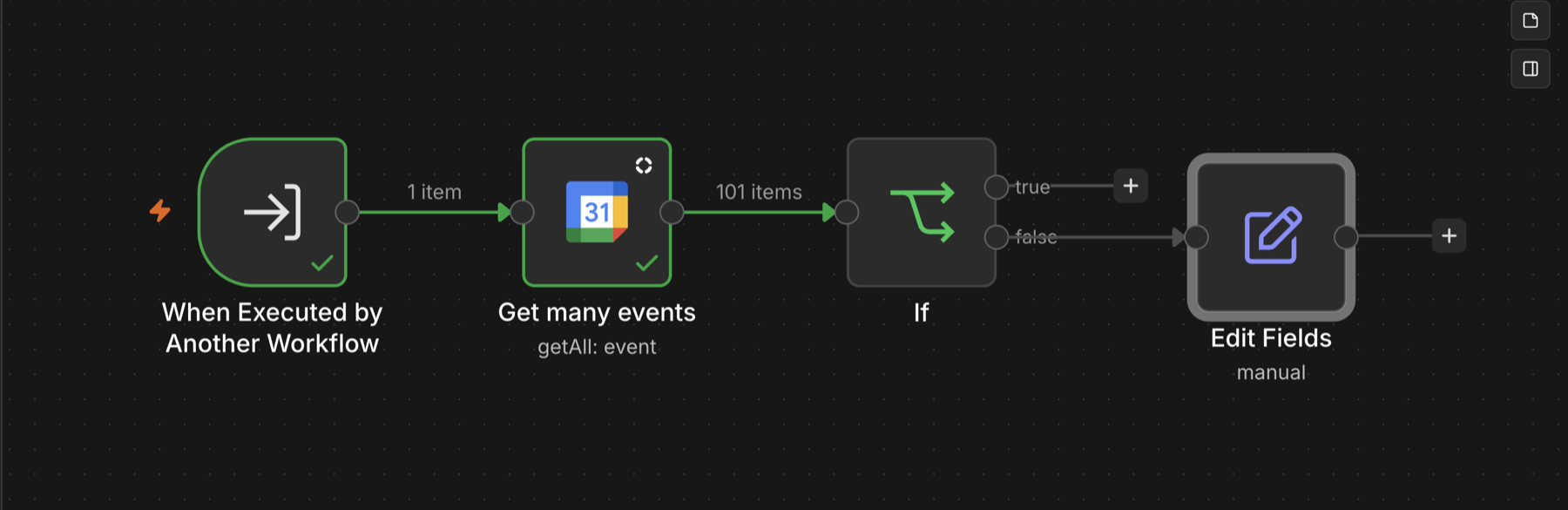
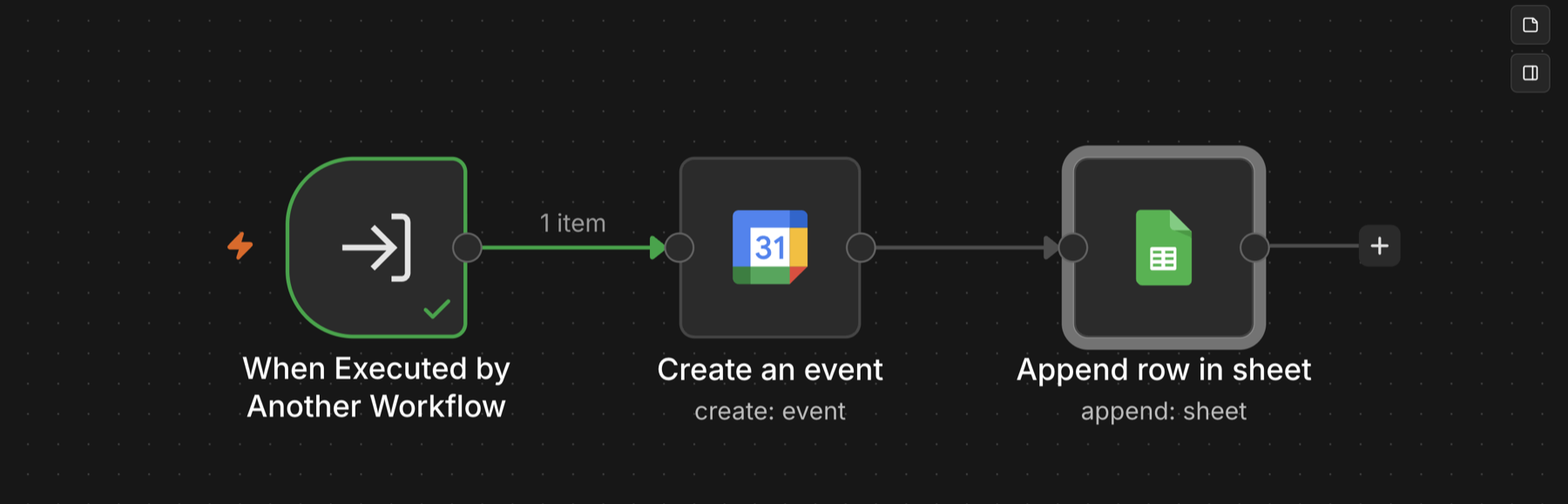
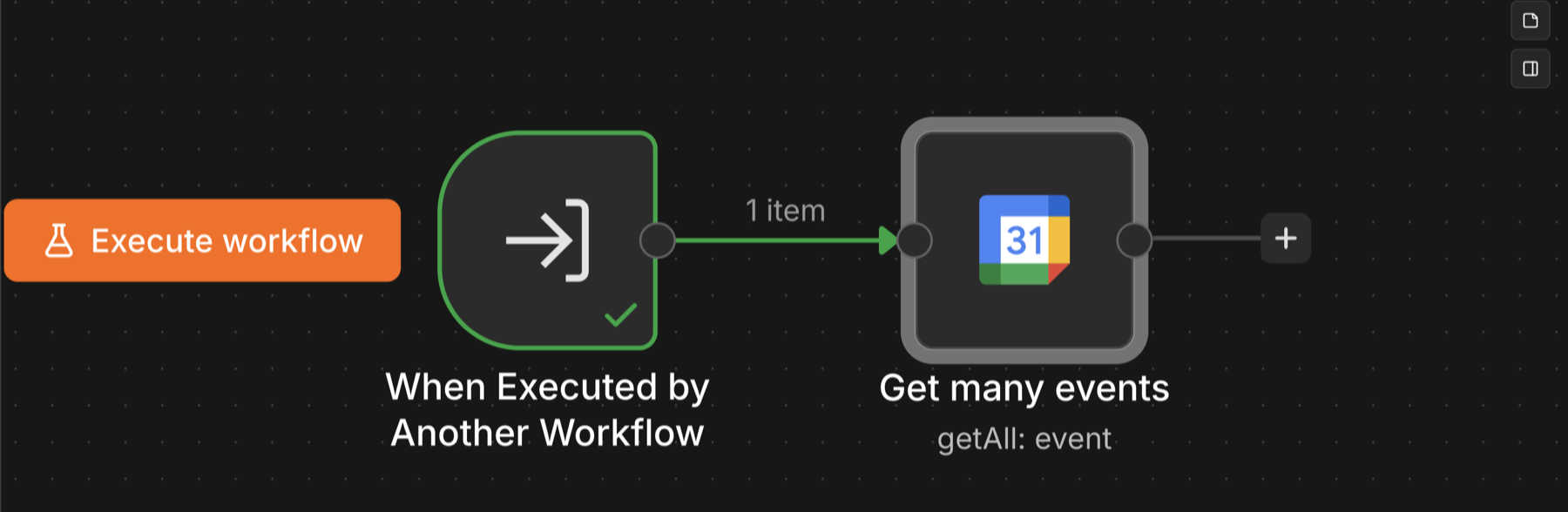
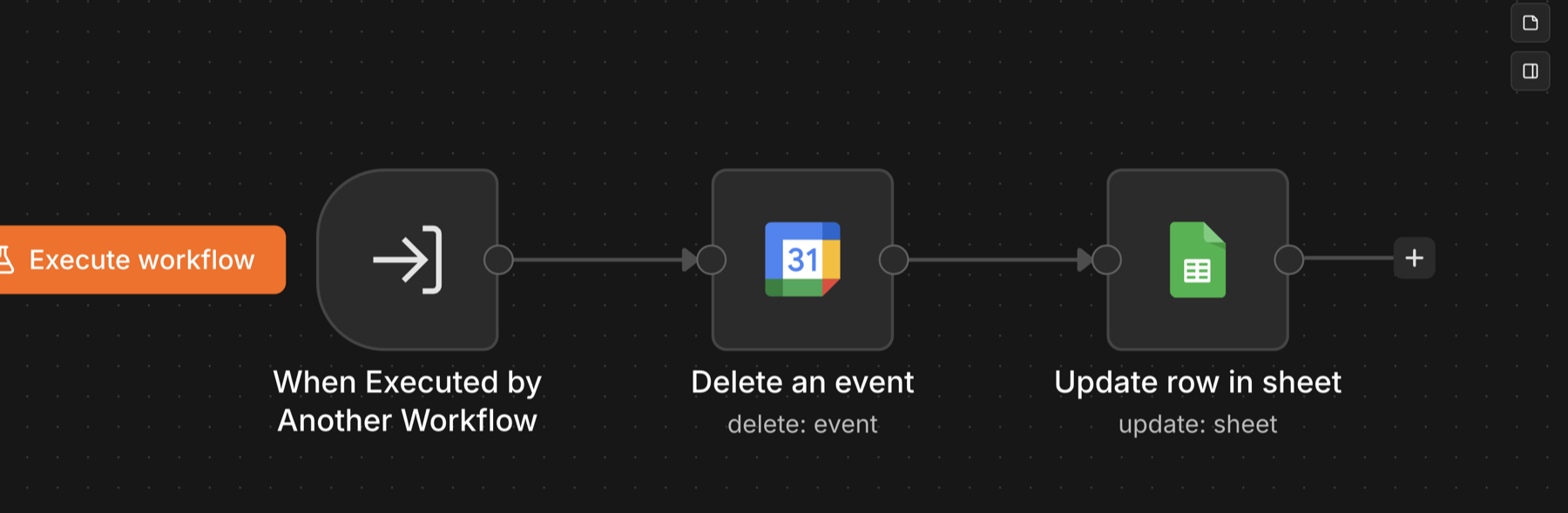
✕I built an inbound AI phone receptionist that answers calls, looks patients up in the CRM, checks live calendar availability, and books, reschedules, or cancels appointments end to end with no human in the loop. The voice layer runs on VAPI and connects to a single n8n MCP server that exposes the calendar and CRM actions as tools. The caller just talks. The agent handles the whole interaction, confirms the details out loud, and writes real events to Google Calendar and patient records to Google Sheets, all while keeping the conversation moving with natural filler so there is no dead air.
System Workflow
- 1Inbound call hits VAPI; the agent greets the caller and asks for their email to look them up
- 2Agent calls the n8n CRM lookup to find the patient in Google Sheets and greets returning patients by name
- 3New callers get a patient profile created on the spot from their name, email, and phone number
- 4Agent checks live availability against Google Calendar before offering any time slot
- 5Only genuinely open slots are offered; busy times are never read out to the caller
- 6Caller picks a time; the agent confirms name, email, and appointment type out loud
- 7Agent books the event in Google Calendar with a one-hour duration and the caller's details
- 8Reschedule requests look up the existing event, confirm a new open time, then move it
- 9Cancellations confirm which appointment is meant, then delete the event
Walkthrough — Voice Agent
Walkthrough — n8n MCP Workflow
System Screenshots